
Imagine your great-grandchild in the year 2124, searching for a glimpse of the person who shared their smile. They find a digital folder, but instead of your face, they encounter a “file corrupted” message or a format that hasn’t been used since the 2040s. With over 4.7 billion photos taken every day in 2024, the risk of your life story vanishing into a digital void is real. You likely feel a deep responsibility to protect these cherished moments, yet the technical hurdles of preserving digital photos for 100 years can feel overwhelming. We believe your memories are a sacred narrative, not just a collection of bits and bytes, and they deserve to be treated with quiet dignity.
This guide offers you a gentle, step by step path to ensure your essence survives the test of time. You’ll learn the practical “3-2-1” backup strategy and how to add the personal stories that turn a file into a legacy. Let’s be honest, your descendants probably don’t need 47 identical, slightly out of focus shots of your 2023 garden salad, no matter how vibrant the tomatoes looked. We’ll show you how to curate your collection and choose formats that stay readable for a century. By the end, you’ll have a clear plan and the profound peace of mind that comes from knowing your story is safe.
Key Takeaways
- Learn how to outsmart “bit rot” by migrating your files to new technology every few years, ensuring your digital inheritance doesn’t become a collection of unreadable ghosts.
- Master the industry-standard “3-2-1” backup rule to shield your family’s visual story from local disasters like fire or flood.
- Discover why preserving digital photos for 100 years is actually more successful when you choose quality over quantity, turning digital clutter into a cherished narrative.
- Find out how to breathe life into silent images by adding your own voice and metadata, so your great-grandchildren don’t have to play a frustrating game of “Who Is This Person?” with your archive.
- Begin a gentle “Digital Audit” to curate the essence of your life, creating a living time capsule that speaks clearly to those you love.
The 100-Year Challenge: Why Digital Memories Are Fragile
Your life story is a masterpiece, a collection of moments that capture your unique essence. We often think that because our photos are digital, they’ll last forever. However, there’s a quiet risk called the Digital Dark Age. While a physical portrait from 1890 can still be held and seen with the naked eye, a digital file from just twenty years ago might already be trapped on a dead hard drive. The technology we use to store our narratives changes so fast that we risk losing the very images we want to pass down to our grandchildren.
Stewardship of your legacy means looking beyond the present moment. It’s about ensuring that the laughter and light captured in your files remain accessible for the next century. We aren’t just saving data; we’re protecting the visual heartbeat of your family history. To succeed at preserving digital photos for 100 years, we have to understand the invisible forces that threaten them.
To better understand this concept, watch this helpful video:
What is Bit Rot and Why Should You Care?
Digital files are made of billions of 1s and 0s. Over time, the physical material of a hard drive or flash drive can degrade, causing those tiny bits of information to flip or disappear. This is called bit rot. Think of it like a physical photograph slowly fading in the sun, eventually, the image becomes a blur. If a single piece of data goes missing in a digital file, the whole photo might refuse to open. You can protect your cherished memories by checking your most important files once every year. If they open quickly and look clear, your digital legacy is still safe.
The Evolution of Formats
Hardware moves even faster than software. If you still have a Zip drive, you might also have a pet dinosaur. Technology from 1994 feels like ancient history now, and the devices needed to read those old disks are vanishing. This is why Digital preservation is an active process, not a one-time task. You have to move your files to new “homes” as technology evolves.
Think of file formats like languages. Some, like JPEG, are spoken by everyone right now, making them a safe choice for everyday sharing. Others, like TIFF files, are like a rich, detailed poem; they take up more space but preserve the highest quality as “master” copies. By choosing the right formats and updating your hardware every five to seven years, preserving digital photos for 100 years becomes a manageable act of love for the generations yet to come.
The Technical Toolkit: Formats and Redundancy
Think of your digital archive as a living garden rather than a static vault. It requires regular tending to thrive across generations. This process is known as migration. To succeed in preserving digital photos for 100 years, you must commit to moving your files to new technology every 5 to 10 years. Technology shifts quickly; the floppy disks of the 1990s are now unreadable museum pieces. By staying ahead of these shifts, you ensure your essence remains accessible to those who haven’t even been born yet.
Choosing the right file format is your first act of stewardship. While JPEGs are common, consider saving your most cherished portraits in open-source formats like TIFF or DNG. These formats are more likely to be recognized by the software and artificial intelligence of the next century. Following the Library of Congress digital photo archiving tips can help you establish a routine that balances quality with longevity.
Metadata: Giving Your Photos a Voice
Metadata is the digital back of the photograph where you would normally scribble with a pencil. Without it, a file name like “IMG_4829.jpg” is just a string of numbers that means nothing to a grandchild. However, a file labeled “Grandpa Joe at the 2026 Bettsville Fair” becomes a priceless treasure. It transforms a simple image into a narrative of a life well-lived.
Choosing Your Storage Media
Not all storage is created equal. External hard drives are affordable but contain moving parts that eventually fail. Solid state drives (SSDs) are faster and more durable, while the cloud offers the convenience of remote access. For those who enjoy exploring specialized tech, the M-DISC is a unique physical option designed to last for centuries by etching data into a rock-like layer. Relying on a single USB stick is a recipe for heartbreak; those little things vanish faster than a single sock in a hot dryer.
- External Hard Drives: Best for bulk storage but should be replaced every 5 years.
- Cloud Storage: Excellent for redundancy, though you must keep your subscriptions active.
- Redundancy: Always keep at least three copies of your most important memories in different locations.
To stay organized, label your physical drives with two specific markers: the “Date Created” and the “Date to Migrate.” For example, a drive set up in 2026 should be clearly marked “Migrate in 2031.” This simple habit provides peace of mind and keeps your legacy moving forward. When you curate your life story with intention, these technical choices become a profound act of love for the future. Preserving digital photos for 100 years is not just about the bits and bytes; it is about ensuring your light continues to shine long after the camera shutter clicks.
The “3-2-1” Strategy for Family Archives
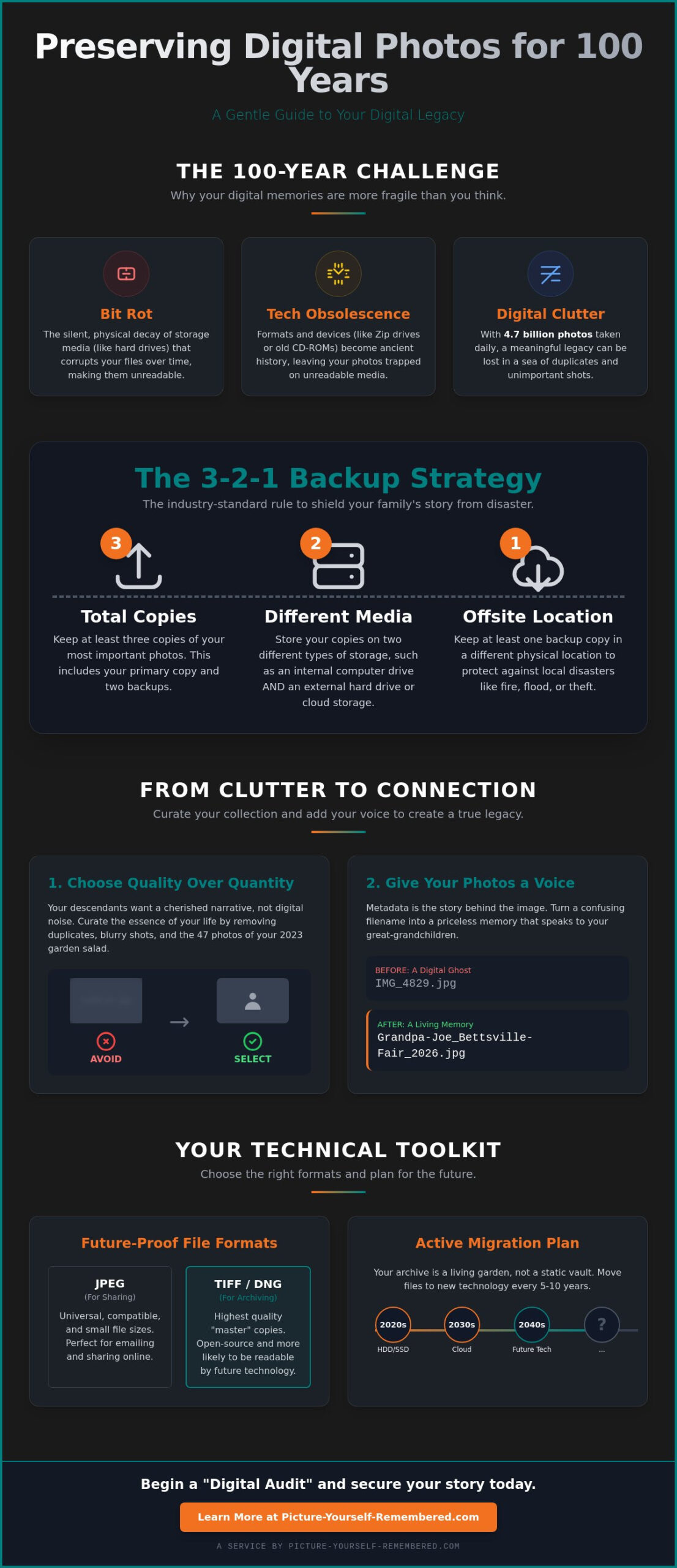
Think of the 3-2-1 strategy as a gentle insurance policy for your family’s most cherished moments. It’s a simple, industry-standard formula that transforms the overwhelming task of digital organization into a meaningful act of stewardship. By creating a redundant system, you ensure that the narrative of your life remains intact even if technology fails or accidents happen. This isn’t just about data; it’s about honoring your essence through intentional preservation.
Many people mistake “syncing” for “archiving.” While services like iCloud or Google Photos are wonderful for daily convenience, they function like a mirror. If you accidentally delete a photo on your phone, that mirror reflects the change and deletes it everywhere else. True archiving is different. It is a deliberate choice to set a copy aside, safely tucked away from the deletions of daily life. By following this structured approach, you’re actively preserving digital photos for 100 years and beyond.
Step 1: Create Three Distinct Copies
The first rule is simple: never let a memory exist in only one place. You should maintain one copy on your primary computer, one on a dedicated external hard drive, and one in a secure secondary location. This redundancy protects you from the heartbreak of a single device failure. While we call it “the cloud,” rest assured your memories aren’t actually floating around in a fluffy white cumulus waiting for a rainy day; they live on physical servers that need your oversight.
Actionable tip: Designate a specific “Archive” drive that remains unplugged most of the time. Once a month, create a recurring “Legacy Hour” on your calendar to plug it in and transfer the previous month’s new memories.
Step 2: Use Two Different Types of Media
Technology evolves, and hardware can be temperamental. To protect your story, store your photos on at least two different types of media, such as a traditional spinning hard drive (HDD) and a Solid State Drive (SSD) or a cloud-based service. We recognize that preserving family history requires this kind of diversity to guard against the specific ways different technologies wear out over time.
Actionable tip: Every year, select your top 10 most meaningful photos and have them professionally printed on archival-quality paper. Physical prints are the ultimate “analog” backup that requires no electricity to view.
Step 3: Keep One Copy Offsite
The final step provides the ultimate peace of mind. Keeping one copy in a different physical location protects your archives from local disasters like fires or floods. Cloud storage is the most effortless way to achieve this, as it keeps your data in a professionally managed facility far from your home. This ensures that even if the unthinkable happens to your house, your history remains safe and sound. Preserving digital photos for 100 years is a marathon, not a sprint; this offsite safety net ensures you reach the finish line.
Actionable tip: If you prefer physical storage over the cloud, keep a second external drive at a trusted relative’s house or in a safe deposit box at your local bank. Swap it out twice a year to keep the files current.
Curating Your Legacy: From Digital Clutter to Connection
We live in an age of digital abundance. In 2023 alone, humans captured an estimated 1.8 trillion photos according to data from Keypoint Intelligence. While having a camera in every pocket is a gift, it also creates a heavy burden for those we leave behind. Imagine your great-grandchildren opening a hard drive only to find a chaotic sea of 50,000 unsorted files. They likely won’t look at them; they’ll feel buried by them. True stewardship means shifting from being a hoarder of data to a curator of memories. By acting as your family’s Chief Legacy Officer, you ensure your life’s narrative isn’t lost in the noise.
Selecting the images that capture your essence requires a gentle touch. It’s not about the technical perfection of a shot, but about the feeling it evokes. Does this photo show your kindness? Does it capture the way you looked at your partner? Preserving digital photos for 100 years is less about hard drives and more about heart. A collection of 100 deeply meaningful images tells a far more powerful story than 10,000 unorganized snapshots that lack context. When we narrow our focus, we allow our true selves to shine through the clutter.
The “Ten-a-Year” Rule
To perform a digital audit without losing your weekend, try the “Ten-a-Year” rule. At the end of every December, sit down with a cup of tea and review your library. Pick only 10 photos that represent your biggest milestones or smallest, most cherished moments. These 10 photos become the primary focus of your preserving digital photos for 100 years strategy. Your great-grandchildren will thank you for not leaving them 400 blurry photos of your lunch or that accidental three-minute video of the inside of your pocket.
Organizing for the Future
Searchability is the key to endurance. Use a clear folder structure like YYYY-MM-DD-EventName. This simple format ensures that a computer in 2099 can still sort your life chronologically. This process of digital remembrance starts with these small, intentional steps. Inside your main archive, create a “Start Here” text file. In this note, explain what the folders contain and why these memories matter. It’s like leaving a map for a future explorer who wants to know who you really were.
The Living Time Capsule: Adding Your Voice to the Archive
A photograph is a beautiful, frozen moment in time. It’s a silent witness to a quiet Tuesday morning or a grand wedding day. While preserving digital photos for 100 years ensures your face remains clear to your great-grandchildren, a picture alone can’t speak your truth. It doesn’t carry the cadence of your laughter or the specific, tender way you emphasize a word of encouragement. By creating a digital time capsule, you’re doing more than just saving data; you’re offering your descendants a seat at your table long after the present moment has passed.
Why Video Completes the Picture
Think about the last time you heard an old recording of a loved one. The emotional resonance is instant and profound. Video adds a layer of intimacy that static pixels simply can’t reach. It captures your essence, the light in your eyes, and the unique narrative of your life. You’ll find more detailed steps on this process in our guide on creating a video legacy. Don’t worry about having a Hollywood production or professional lighting. Your future family won’t care if you’re having a questionable hair day that would make a 1980s rock star jealous; they just want to see your smile and hear your heart.
- Actionable Tip: Pick your most cherished family photo right now. Record a simple two-minute video on your phone explaining the story behind it, who was there, and how you felt when it was taken.
Scheduling Your Legacy for Delivery
The real magic happens when you bridge the gap between today and the distant future. Our platform allows you to schedule a future message to arrive at the exact moment it’s needed most. Imagine your great-grandson receiving a video from you on his 21st birthday in the year 2095, or a couple celebrating their 50th anniversary with a message you recorded decades earlier. This is the ultimate act of stewardship. Preserving digital photos for 100 years becomes a proactive conversation rather than a passive archive, ensuring your influence remains a steady, guiding light.
- Actionable Tip: Start with a Basic Membership to secure your first message and begin your 99-year journey of intentional remembrance.
At the end of the day, a photo shows them what you looked like. A video tells them who you were. By adding your voice to the archive, you ensure that your legacy isn’t just seen, it’s truly felt.
Crafting a Bridge to Your Great-Grandchildren
Your life’s essence isn’t found in 10,000 blurry screenshots of what you had for lunch back in 2014; it lives in the curated moments that define your heart. By mastering the 3-2-1 backup strategy, you ensure your narrative survives the fragile nature of modern hardware. This method requires keeping 3 copies of your data on 2 different types of media with at least 1 copy stored offsite. It’s the difference between a fading memory and a vivid portrait that stands the test of time. Besides, this approach is much safer than a dusty shoebox in the basement that’s just one leaky pipe or a curious cat away from a total disaster.
The art of preserving digital photos for 100 years is a commitment to stewardship that honors your unique journey. Stanley Poe founded Picture Yourself Remembered to provide a heart-centered solution for families who refuse to let their history disappear into the digital void. We offer a secure digital vault specifically designed for 99-year delivery, ensuring your voice reaches the people who haven’t even been born yet. It’s time to transform your digital clutter into a meaningful inheritance of love and connection.
Start your 99-year legacy today with a Basic Membership at Picture-Yourself-Remembered
Take a deep breath and know that your story is safe. You’re building a beautiful bridge to the future, and the view from here is truly spectacular.
Frequently Asked Questions
Will JPEGs still work in 100 years?
JPEGs will likely remain readable because they’ve been the global standard for digital imagery since 1992. While technology shifts, the sheer volume of billions of existing JPEG files means software developers will keep creating converters for future systems. It’s a universal language for our visual heartbeats.
To be safe, you can keep a secondary copy in a format like TIFF. This provides an extra layer of protection for your family’s essence. Think of it as a universal translator for your most cherished moments.
Is cloud storage safer than a physical hard drive?
Cloud storage is generally more resilient than a single hard drive because companies like Google use data redundancy across multiple servers. A typical external hard drive has a failure rate of about 20 percent after four years of use. For preserving digital photos for 100 years, your best bet is the 3, 2, 1 rule.
Keep three copies of your library, use two different media types, and store one copy offsite. This creates a sturdy safety net for your history. It ensures your narrative survives even if a single device fails.
How often should I move my digital photos to a new device?
You should migrate your library to a new storage device every 3 to 5 years to stay ahead of hardware failure. Digital rot is a real concern, and older drives can become unreadable if they sit idle for too long. Regular movement keeps the data “fresh” and accessible.
Set a recurring calendar alert for a legacy checkup to ensure your stewardship remains active. This predictable rhythm protects your family’s history from becoming trapped on obsolete hardware. It’s a small act of love that yields a century of connection.
What is the best way to label digital photos for future generations?
The most effective way to label your memories is by using a naming convention like YYYY-MM-DD-Event-Name and embedding metadata. Don’t just rely on a folder named “Vacation,” because 50 years from now, your great-grandchildren won’t know which beach that was. Specificity is the key to being remembered clearly.
Add the names of people in the photo’s description field within your software. It’s like writing on the back of a physical print, but it won’t bleed through the paper or fade with time. This detail turns a simple image into a rich story.
Can I really schedule a message to be delivered 99 years from now?
You can schedule a message for the next century by using a dedicated legacy platform or a legal trust. While standard email providers don’t offer a 99 year delay, services designed for digital inheritance allow you to designate legacy contacts who receive access after a specific event. It’s a beautiful way to ensure your voice reaches a generation you might never meet.
Just hope they still use screens and haven’t moved to telepathic implants by then. These tools provide a visionary way to bridge the gap between the present and a future you’re helping to shape.
How much digital storage do I actually need for a family legacy?
A 2 terabyte drive can hold roughly 500,000 high-resolution photos, which is usually more than enough for a curated family narrative. Instead of saving every blurry shot of your lunch, focus on the 10 percent of images that truly capture a person’s soul. Quality always trumps quantity when you’re building a bridge to the future.
Culling your collection makes it easier for your heirs to navigate your life story. A smaller, more intentional collection is much more likely to be cherished than a massive, unorganized digital junk drawer.
What happens to my digital photos if a company like Google or Apple goes out of business?
If a major tech giant closes, your data could disappear, which is why relying on a single company is risky for your legacy. History shows that even giants can fall, so keep a physical copy on an M-Disc or a high-quality SSD at home. Diversifying your storage ensures your narrative isn’t tied to a single corporation’s stock price.
Check your account settings for “Legacy Contact” features today. These tools allow you to name a steward who can download your essence if the service ever announces a shutdown or if you pass away.
Is it worth printing digital photos to ensure they last 100 years?
Printing your most cherished photos on archival paper is a brilliant strategy for preserving digital photos for 100 years. High-quality pigment inks and acid-free paper can last over a century without needing a power cord or a software update. A physical album is a tactile legacy that invites a different kind of connection.
It acts as the ultimate low-tech insurance policy for your most precious stories. Even if every computer on earth stopped working, your great-grandchildren could still hold your portrait in their hands and feel your presence.
