
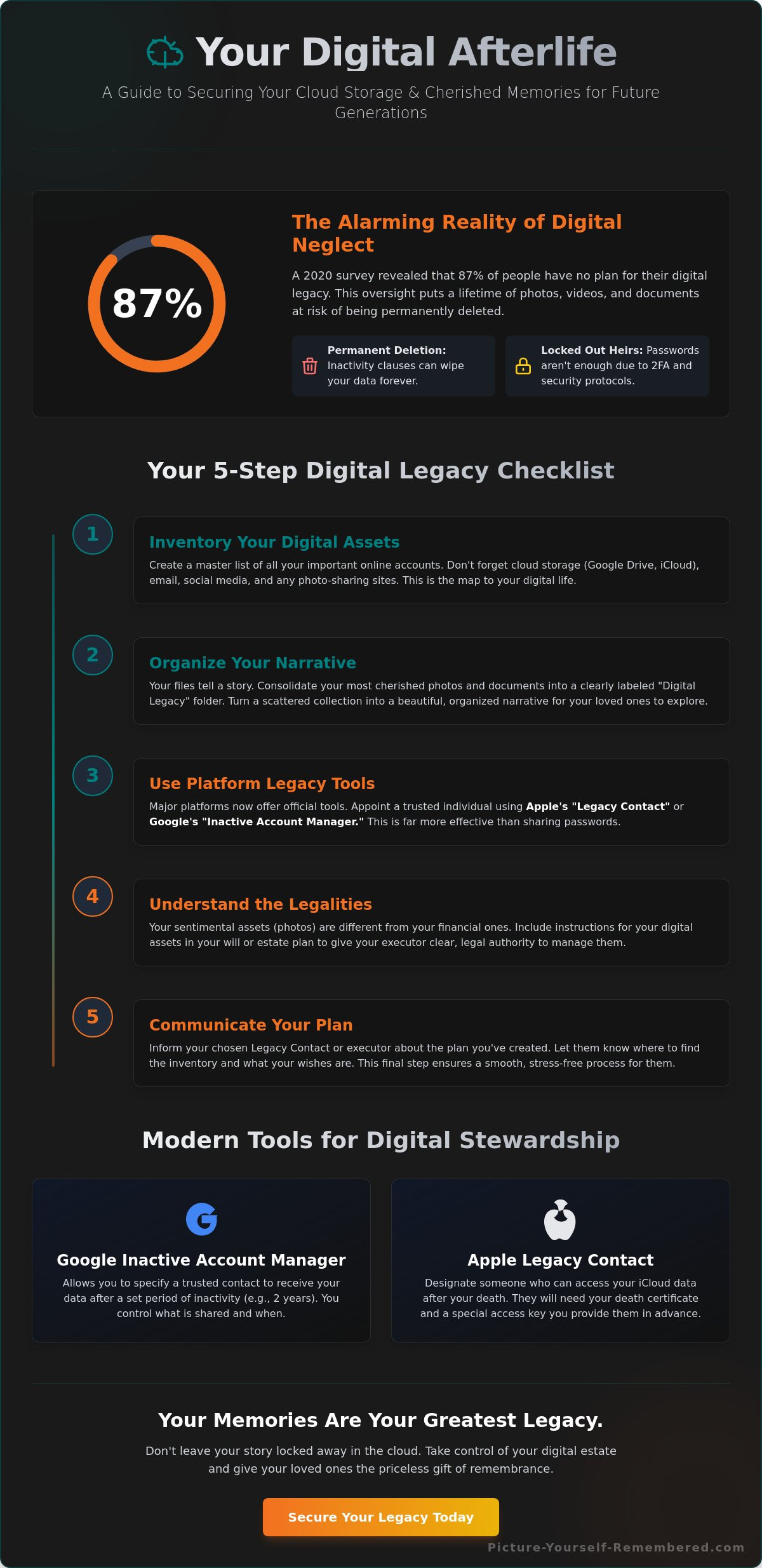
In a 2020 survey by Choice Mutual, 87 percent of respondents admitted they had no plan for their digital legacy, leaving a lifetime of cherished photos and messages at risk of vanishing. Imagine your loved ones sitting around a laptop, trying to guess your first pet’s name just to see the pictures of your last family vacation, only to be met with a “login denied” screen. It’s a heavy question to ask, but have you wondered what happens to my cloud storage when I die? Your digital life is a modern-day attic, filled with the essence of who you are, yet it’s governed by complex rules that don’t always favor your family.
You likely feel a bit of guilt or confusion when looking at that “Storage Full” notification, and the thought of leaving a digital mess behind is genuinely stressful. It’s perfectly normal to feel overwhelmed by legal jargon and tech settings that seem designed to keep people out. Most of us have more photos of our avocado toast than our ancestors had of their entire lives, so organizing this narrative is no small feat. This guide is here to provide peace of mind by showing you exactly how to ensure your most precious memories aren’t lost to the cloud forever. We’ll walk through simple, actionable steps to grant access to your heirs and build a clear plan for your digital stewardship.
Key Takeaways
- Learn how to safeguard your “digital estate” from inactivity clauses that might otherwise erase your most cherished photos and documents.
- Discover exactly what happens to my cloud storage when I die and how to use modern “Legacy Contact” tools to keep your digital front door open for those you love.
- Follow our simple five-step checklist to inventory your accounts, turning a scattered collection of files into a beautiful, organized narrative of your life.
- Understand the legal difference between your financial assets and your sentimental ones, ensuring your family can easily access the memories that truly matter.
- Find out why setting up a digital legacy is much more effective than leaving your passwords on a post-it note that will inevitably end up behind the refrigerator.
The Digital Afterlife: What Really Happens to Your Cloud Storage?
We spend our lives capturing moments, from the first steps of a child to the quiet beauty of a sunset. These fragments of our essence live in the cloud, tucked away in folders and galleries. It’s natural to wonder Digital Inheritance and how it impacts your family. Understanding what happens to my cloud storage when I die is a profound act of love for those you’ll eventually leave behind. Most of us don’t actually own our digital accounts. Instead, we hold a simple license to use the service, which often expires when we do.
To better understand how our digital footprints endure, watch this helpful video:
The emotional weight of these digital heirlooms is immense. A single photo can hold a lifetime of meaning, and losing that connection feels like losing a piece of the person. It’s a heavy question to ask what happens to my cloud storage when I die, yet it’s a necessary step in honoring your journey. We aren’t just talking about files; we’re talking about the visual narrative of a life well-lived.
The Reality of Account Deletion
Digital death occurs when an account is flagged as inactive. Most major providers have a specific window, often between 12 and 24 months, before they trigger a permanent data wipe. Your digital estate is the sum of your online essence. If no one logs in to maintain that presence, the servers eventually wipe the slate clean. Google updated its policy in December 2023 to begin deleting accounts that have been inactive for at least two years, which can lead to the permanent loss of cherished memories.
Why Knowing the Password Isn’t Enough
You might think leaving a list of passwords is the ultimate solution. However, security features like Two-Factor Authentication (2FA) often create a massive hurdle for grieving family members. If they can’t access your physical phone to receive a login code, they’re effectively locked out. Most Terms of Service agreements technically forbid sharing passwords, creating a legal grey area for your loved ones. It’s a strange irony that you can pass down a physical house with a simple key, but your family might need a court order just to see those 40,000 cat photos you painstakingly backed up.
Actionable Tip: Take ten minutes today to look into the “Legacy Contact” or “Inactive Account Manager” settings on your primary email and cloud accounts. Setting these up ensures your story continues even when you aren’t there to tell it.
Platform Policies Decoded: Google, Apple, and Beyond
Understanding what happens to my cloud storage when I die starts with looking at the digital giants who hold our most cherished memories. For a long time, tech companies treated digital accounts like locked vaults with no keys. Today, the approach has shifted toward stewardship. Most platforms now offer tools that allow you to decide if your data should be a closed chapter or a living narrative for your family. This shift is supported by a growing legal framework for digital assets that helps executors manage these invisible belongings with grace and clarity.
It is vital to distinguish between memorializing an account and transferring its contents. Memorialization often keeps a profile visible as a digital headstone but restricts access to the actual files. Transferring data, however, ensures your photos and journals reach the hands of those who value them. Because technology moves fast, you should revisit these settings every 24 months to ensure your choices still reflect your heart’s intent. Choosing a legacy contact is a big deal, so maybe don’t pick the friend who still hasn’t returned that Tupperware you lent them in 2019.
Google Inactive Account Manager
Google provides a thoughtful tool called the Inactive Account Manager to handle your digital essence. You begin by setting a wait period, such as 3 or 18 months of inactivity, before Google takes any action. You can then designate up to 10 trusted individuals to receive a notification and a link to download specific data folders. If you prefer a quiet exit, you can choose the self-destruct option, which deletes your account entirely after the timer expires. This allows you to curate exactly how you are perceived by future generations.
Apple Legacy Contacts
Apple introduced its Legacy Contact feature in December 2021 to simplify the inheritance of iCloud data. To set this up, you generate a 16-character Legacy Key within your iPhone settings. This key is the bridge between your life today and your family’s peace of mind later. Your chosen contact will still need to provide a death certificate to Apple to gain access, ensuring a secure handoff. It is wise to print this key and store it in a fireproof safe or share it through a secure digital vault. By taking these small steps, you are performing a profound act of love for your survivors.
Taking control of your digital story is a beautiful way to protect your essence. If you feel ready to go deeper into preserving your life’s work, consider how you can curate your lasting legacy with intentionality and warmth.
The Legal Reality of Digital Ownership
It feels like home because it’s where your memories live. You’ve paid monthly subscriptions for years, so it’s natural to feel a sense of property ownership. However, the legal reality is that cloud storage is more like a long-term rental than a house you own. When you wonder what happens to my cloud storage when I die, the answer often hides in the fine print of those Terms of Service agreements. Most providers grant you a non-transferable license that technically ends when you do. You don’t own the “land” in the cloud; you simply have permission to use it.
The legal landscape is shifting to protect your essence. Since 2015, more than 40 states have adopted versions of the Revised Uniform Fiduciary Access to Digital Assets Act. This allows probate courts to treat your digital footprint with the same weight as your physical property. To ensure your family isn’t locked out, you should include specific digital instructions in your traditional will. Without these legal keys, your loved ones might face a wall of bureaucracy during an already tender time. Let’s be honest: your digital executor is the person you trust most not to judge your 3 a.m. search history or your collection of 4,000 blurry photos of your cat.
Sentimental vs. Financial Assets
A cryptocurrency wallet and a folder of family vacation photos both live in the cloud, yet they require different levels of stewardship. Financial assets usually have clear beneficiaries and legal paths for transfer. Sentimental assets are often left in a quiet, forgotten corner. While a bank understands a balance, a cloud provider doesn’t always recognize the sacred nature of your scanned journals or voice notes. This is why preserving family history is a separate, intentional act of love. To make sure your story continues, you need a digital estate plan that accounts for both your financial wealth and your narrative worth.
The Role of a Digital Executor
Choosing a digital executor is a practical gift for your grieving family. This person doesn’t need to be your primary heir; they simply need to be tech-savvy enough to navigate a two-factor authentication prompt without frustration. They are responsible for closing social media accounts, archiving precious photos, and managing your digital legacy. A digital executor is the steward of your online shadow. When you consider what happens to my cloud storage when I die, this person is the bridge between your digital existence and the peace of your family.
- Create a “Legacy Letter” that lists your accounts, though you should keep actual passwords in a secure manager.
- Appoint a digital executor in your will to give them legal standing with tech companies.
- Set up “Legacy Contacts” on platforms like Apple or Google today.
- Write down clear instructions on which folders should be saved and which should be deleted.
Creating Your Digital Legacy Checklist: 5 Steps to Take Today
Taking control of your digital essence doesn’t have to feel like a heavy chore. It’s a profound act of stewardship for those you’ll eventually leave behind. When you consider what happens to my cloud storage when I die, the answer depends entirely on the intentional footprints you leave today. By organizing your virtual world, you ensure your family isn’t locked out of precious memories or burdened by mystery accounts that remain frozen in time.
Inventorying Your Digital Life
Start by identifying where your stories live. According to 2023 security reports, the average internet user now manages over 100 different sets of credentials. That is a lot of virtual junk drawers to sort through. To keep things manageable, focus your energy on the Big Three: your primary email, your cloud photo libraries, and your social media profiles. These are the windows into your daily life and your most cherished connections.
Using a password manager like 1Password or Dashlane acts as a master key for your future executors. It’s much more reliable than leaving a trail of sticky notes that your cat will inevitably knock behind the desk during a midnight zoomie session. Beyond just logins, consider recording messages for loved ones to provide context for your files. A folder of photos is merely a collection; a folder of photos accompanied by a voice note explaining why that specific sunset mattered becomes a lasting legacy.
Sharing the Plan
Once you’ve mapped out your digital estate, you need to invite someone in. This conversation doesn’t need to be somber. You can approach it with a simple, “I’ve organized my photos and accounts because I want you to have these memories without any stress.” It’s a gift of clarity that prevents future confusion. Follow these five concrete steps to secure your narrative:
- Set up native legacy tools: Use Google’s Inactive Account Manager or Apple’s Legacy Contact feature. These built-in settings allow you to choose exactly who gets access after a period of inactivity.
- Document specific wishes: Be clear about your “digital boxes.” You might want your “Work Drafts” deleted but your “Family Vacation” folders preserved for the next generation.
- Store master access keys: Place a printed sheet with your master password or account recovery keys in a secure, physical location like a home safe.
- Inventory your financial accounts: Ensure your digital banking and subscription logins are listed so your family can settle your affairs gracefully.
- Communicate the plan: Tell your chosen legacy contact where your “Legacy Folder” is kept so they aren’t searching for answers during a time of grief.
Thinking about what happens to my cloud storage when I die allows you to curate the portrait of your life. It transforms a scattered collection of data into a beautiful, accessible story of who you are. If you’re ready to start shaping your story with grace and intention, explore our legacy planning resources to guide your journey.
Beyond Storage: Ensuring Your Most Precious Messages Reach the Future
When we ask what happens to my cloud storage when I die, we’re usually thinking about data privacy or account access. But there’s a deeper layer to this question that goes beyond technical settings. Storing a file is a passive act; it’s like putting a letter in a box and hoping someone finds it in the attic years later. True legacy isn’t about hoarding gigabytes of data. It’s about ensuring your voice reaches the people you love exactly when they need to hear it most. While cloud storage keeps files alive, it doesn’t guarantee they’ll be heard.
The Problem with Passive Storage
Files can stay safe in the cloud for decades and still be completely forgotten. A 2022 survey by the Digital Legacy Association found that 65 percent of people haven’t made any formal plans for their digital assets. Without a plan, your most meaningful videos become digital clutter. Finding a video of a grandmother’s laugh shouldn’t feel like an exhausting scavenger hunt through thousands of unsorted photos. True digital remembrance is about moving from accidental discovery to intentional storytelling. It’s the difference between a dusty folder and a scheduled delivery. Let’s be honest, leaving your family to guess your password, which is probably just your cat’s name plus “123”, isn’t much of a strategy.
To avoid this, try this actionable tip: once a month, move your five most precious “legacy” files into a separate, clearly labeled folder. This small act of stewardship makes it much easier for your loved ones to find the heart of your story later on.
Your Voice, Delivered on Your Terms
Picture Yourself Remembered transforms the question of what happens to my cloud storage when I die into a promise of connection. Through our proactive stewardship service, you aren’t just uploading files to a “Digital Vault.” You’re scheduling moments of love. Our Basic Membership provides the tools to record messages today that will be delivered on a future wedding day, a 50th anniversary, or a milestone birthday. We provide a 99-year delivery promise to bridge the gap between generations. This ensures your narrative remains intact even as technology platforms change.
- Intentionality: Choose the exact date and recipient for your message.
- Longevity: Rely on a system designed for a century of care.
- Clarity: Remove the burden of searching from your grieving family.
Your essence deserves a better home than a forgotten server. Learn how Picture Yourself Remembered works to secure your narrative and turn your digital footprint into a lasting bridge. Start today by recording a simple thirty-second video for a loved one. It doesn’t have to be perfect; it just has to be you.
Your Story Deserves a Forever Home
Your digital life shouldn’t be a puzzle for your loved ones to solve. We’ve explored how major platforms handle your data; however, the real power lies in your hands today. By setting up a Legacy Contact, a feature Apple introduced in late 2021, you ensure your photos don’t vanish into the ether. Let’s be honest, unless you’ve figured out how to smuggle your smartphone past the pearly gates, someone else will eventually need those login codes. Understanding what happens to my cloud storage when I die is the first step toward true peace of mind. Take five minutes right now to list your primary recovery email in a physical file. It’s a simple act of stewardship that saves your family hours of future stress.
Stanley Poe founded Picture Yourself Remembered to bridge generational gaps, ensuring your essence remains accessible long after hardware fails. You can preserve your narrative in a secure digital vault designed to stand for 99 years. Instead of leaving behind locked folders, you can schedule heartfelt video deliveries tailored to your specific timeline. It’s about distilling the beauty of your life into a gift for the future.
Start your journey of being remembered today with a Basic Membership
Your influence is a masterpiece that’s still being painted, and we’re here to help you protect every brushstroke.
Frequently Asked Questions
Does Google delete my photos after I die?
Google typically marks an account as inactive after 24 months of no use, which may lead to the deletion of your cherished photos. If you are worried about what happens to my cloud storage when I die, you should set up their Inactive Account Manager today. This tool allows you to decide when Google should consider your account inactive and who should receive a link to download your digital narrative.
Can my spouse access my iCloud account if they have my password?
While your spouse can log in with your password, Apple’s security protocols might lock the account if they detect unusual activity from a new location. Relying on a shared password is risky because two-factor authentication often requires access to your physical phone. Instead, naming them as a Legacy Contact ensures they have a legal, Apple sanctioned way to preserve your essence without feeling like a digital cat burglar.
What is a Digital Executor and do I need one?
A Digital Executor is a trusted person you appoint to manage your online presence, from social media to cloud storage, once you’ve moved on. You absolutely need one because 90% of traditional wills don’t cover digital assets. By naming a steward for your data, you ensure your story isn’t lost to a forgotten password. Think of them as the curator of your digital museum, keeping the lights on for future visitors.
How do I set up a Legacy Contact on my iPhone?
You can set up a Legacy Contact by opening your iPhone Settings, tapping your name, and selecting Password and Security. From there, tap Legacy Contact to choose a person who will receive an access key to your account. This simple 3 minute task ensures your family can view your photos when you are no longer here. It is much easier than trying to explain 5G to your ancestors through a crystal ball.
Will my social media accounts stay active forever?
Most social media accounts will eventually go dark or be deleted unless you choose to memorialize them. On Facebook, for instance, you can select a legacy contact who can manage your profile as a digital headstone. Without these settings, your account might just sit in a digital vacuum. Taking action now ensures your online presence remains a warm, living tribute rather than a cold, abandoned storefront that collects digital dust.
Is there a way to schedule messages to be sent after I pass away?
You can use services like Scheduled or Google’s Inactive Account Manager to send final messages to your loved ones after you are gone. These tools allow you to write letters or record videos that are delivered only after a period of inactivity. It’s a beautiful way to offer a final word of comfort or a cherished memory. Just make sure you don’t accidentally schedule a reminder to take out the trash.
What happens to my paid subscriptions (Netflix, Spotify) when I die?
Your paid subscriptions like Netflix or Spotify will continue to bill your credit card until the account is manually closed or the card is canceled. Companies don’t automatically know when a subscriber passes away, so these charges can continue for months. Providing your Digital Executor with a list of these services helps them tidy up your financial footprint quickly. This prevents your estate from paying for a “Premium” plan you aren’t using.
How can I ensure my digital videos are preserved for my grandchildren?
To ensure your grandchildren see your smile, you should use a combination of cloud storage and physical backups like an M-Disc, which is designed to last 1,000 years. Relying solely on one platform is risky, as technology changes quickly. This multi-layered approach to stewardship protects your narrative from digital decay. When you wonder what happens to my cloud storage when I die, remember that intentional planning today creates a bridge to your family’s future.
