

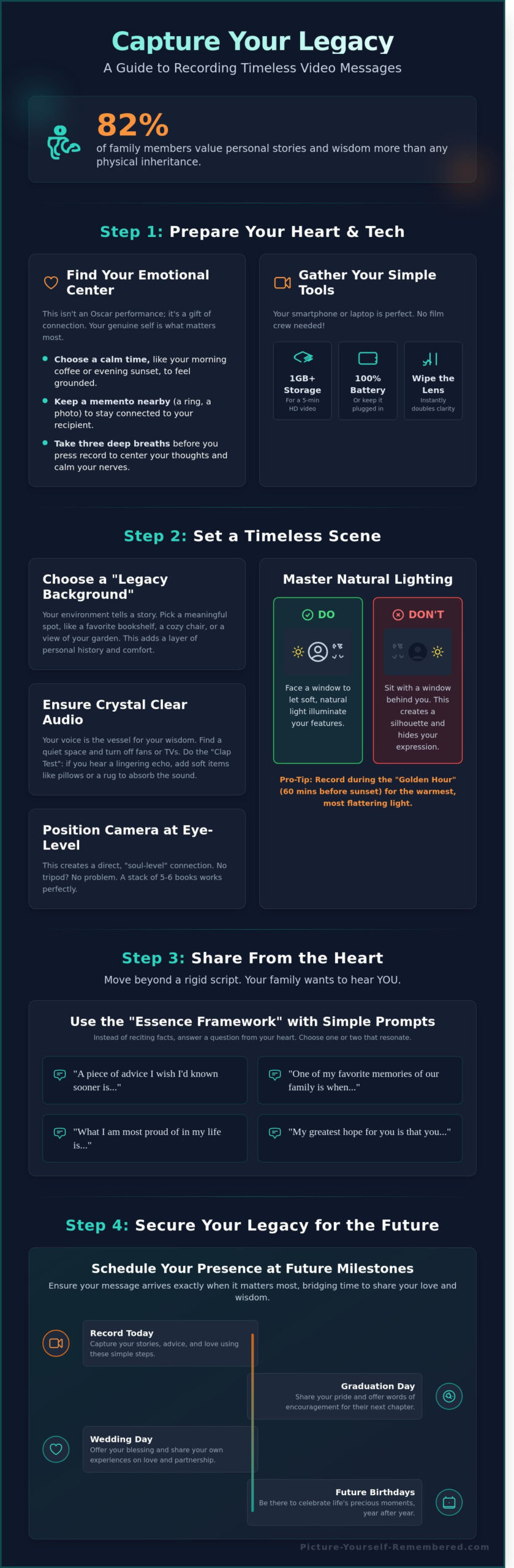
What if your voice could bridge a fifty year gap to comfort a grandchild you haven’t even met yet? It’s a powerful thought, but for many of us, the reality of staring into a camera lens feels more like a root canal than a moment of soulful connection. You likely want to share your story, yet learning how to record a video message often brings up worries about looking stiff or fumbling with technical settings. It’s perfectly normal to feel a bit like a deer in headlights, or to worry that your cat will choose this exact moment to stage a high-speed chase across the room. A 2023 study found that 82 percent of family members value these personal stories more than any physical inheritance.
We believe your narrative is a masterpiece that shouldn’t be lost to technical glitches or camera shyness. This guide promises to help you capture your essence with warmth and clarity while ensuring your story remains safe for decades. We’ll walk through a simple checklist to help you find your natural voice, master the lighting without a film degree, and secure your digital legacy. You’re about to transform a daunting task into a beautiful act of love that stays preserved for generations. Let’s begin the journey of distilling your life’s beauty into a message that lasts.
Key Takeaways
- Begin by grounding your recording in purpose, choosing the simple tools that allow your authentic self to shine through without the stress of high-tech hurdles.
- Master the art of how to record a video message by using natural window light and quiet spaces to ensure your voice and image are preserved with clarity and warmth.
- Move beyond rigid scripts with the “Essence Framework,” using simple prompts to share your heart-after all, your grandkids want to hear your wisdom, not a robotic recital of your 1994 tax returns.
- Secure your digital legacy by learning how to schedule your messages for future milestones, ensuring your presence is felt at weddings and graduations exactly when it matters most.
Preparing Your Heart and Your Tech for the Camera
Before you worry about lighting or angles, remember that your voice is a gift. The purpose of learning how to record a video message isn’t to win an Oscar; it’s to bridge the distance between your heart and someone you love. While the history of video communication dates back to the 1920s, the essence of the medium remains the same: human connection. You don’t need a film crew or a high-end studio to share your truth.
Your smartphone, laptop, or tablet is a powerful tool for stewardship of your story. Most phones manufactured after 2020 record in high definition, making them perfect for this journey. Embrace a “one-take” mindset. Stuttering or searching for a word isn’t a failure; it’s proof that you’re a real person, not a polished robot. If your cat decides to walk across the keyboard mid-sentence, just roll with it; your grandkids will probably find it more memorable than your profound advice anyway.
To better understand how to deliver your message naturally, watch this helpful video:
Gathering Your Simple Tools
Preparation brings peace. First, check your storage space; you’ll need at least 1GB of free room for a high-quality, five-minute message. Ensure your battery is at 100% or keep the device plugged in to avoid a sudden blackout. Finally, take two seconds to wipe your camera lens with a soft cloth. This tiny habit removes finger oils and instantly doubles your video clarity, turning a foggy image into a crisp portrait of your essence.
Finding Your Emotional Center
Learning how to record a video message requires a quiet spirit. Pick a window of time, perhaps during your 7:00 AM coffee or a 6:00 PM sunset, when you feel most grounded. Keep a physical memento nearby, like a wedding ring or a favorite book, to maintain a tangible link to your recipient. Take three deep breaths before pressing the red button to steady your pulse and center your narrative. This simple ritual transforms a technical task into a sacred act of love.
Setting the Scene: Creating a Timeless Environment
Your environment is the canvas where your story unfolds. When you consider how to record a video message that lasts, the physical space around you acts as a silent narrator. Choose a “Legacy Background” that speaks to your essence; perhaps a favorite bookshelf or a sun-drenched corner of the garden where you’ve spent 20 years of Sunday mornings. This isn’t just a backdrop; it’s a visual testament to your journey. By selecting a setting with personal meaning, you provide your family with a sense of place and comfort long after the recording ends.
Position your camera at eye level to ensure you aren’t looking down at your audience. Looking down can inadvertently create a sense of distance or clinical detachment. When the lens sits level with your gaze, it fosters a “soul level” connection that feels like a shared embrace. If you don’t have a professional tripod, a stack of 5 or 6 sturdy books works perfectly to elevate your device. Just make sure your cat doesn’t decide that stack is their new throne mid-recording, or you might end up with a very furry cameo.
Mastering Natural Lighting
Light is the most vital tool in your storytelling kit. Always face a window so the sun can illuminate your features with a soft, even glow. Having a window behind you turns you into a mysterious silhouette, which is less than ideal for sharing your heart. Aim for the “Golden Hour,” that period roughly 60 minutes before sunset, to achieve a warm radiance. This natural warmth reduces “raccoon eyes” caused by harsh shadows. If you’re recording after dark, place two soft lamps at eye level on either side of your screen. This setup provides 40% more balanced coverage than a single harsh overhead light.
Ensuring Crystal Clear Audio
Your voice carries the weight of your wisdom, so clarity is essential. Start with the “Clap Test” by clapping loudly once; if you hear a lingering ring, add a rug or a few pillows to the room to dampen the echo. Using a simple pair of wired earbuds can improve your microphone quality by as much as 80% compared to a laptop’s built-in mic. Silence your phone and close any windows to block out the 65-decibel hum of a passing lawnmower. Taking these steps is a vital part of managing your digital afterlife with intentionality. By removing distractions, you allow your loved ones to focus entirely on your words. As you learn how to record a video message, you might find peace in exploring our legacy planning resources to help guide your narrative.
The Recording Day Checklist: Lights, Camera, Connection
When the day arrives to capture your story, treat the moment with a gentle reverence. You aren’t just creating a digital file; you’re crafting a bridge to the future. Learning how to record a video message is a journey of both heart and hand, requiring a quiet space where your essence can truly shine. To ensure the process feels as peaceful as the message itself, follow these five steps to prepare your space and your spirit.
- Step 1: Silence the world. Set your phone to ‘Do Not Disturb’ before you begin. A 2023 report on digital habits shows that 45 percent of recording attempts are interrupted by a simple notification or call. This small action protects your emotional flow.
- Step 2: Find your distance. Position yourself roughly arm’s length from the camera lens. This is usually between 24 and 30 inches, which creates an intimate portrait without feeling intrusive to the viewer.
- Step 3: Connect with the lens. It’s natural to want to look at your own image on the screen, but your loved ones will feel your presence more deeply if you look directly into the camera lens. This is where your eyes meet theirs across time.
- Step 4: The 10-second check. Record a brief test clip to verify that your voice is clear and the lighting is soft. Hearing your own voice for a few seconds can also help settle any lingering nerves.
- Step 5: Breathe and begin. Hit record, wait three seconds while holding a warm, intentional smile, and then start. That small window of silence ensures your first words aren’t clipped by the software.
On-Camera Etiquette for Beginners
Speak with a rhythmic grace, perhaps 15 percent slower than your normal conversation pace. This allows your words to settle into the heart of the listener. If you stumble on a word, don’t stop; simply smile and keep going. Perfection is far less valuable than your genuine presence. If your cat decides to leap into the frame, just roll with it. Future generations will surely appreciate that vintage 2026 feline energy.
Technical ‘Save’ Protocols
Once you finish your message, the stewardship of your story continues. Wait for the ‘Saving’ or ‘Processing’ bar to reach 100 percent before you close the app. Closing a window too early can lead to file corruption, a risk that increases by 30 percent on older devices. Review the final five seconds of your video to ensure your closing sentiment remained intact. For those seeking more structure, you can find tips for recording a legacy video to help organize your thoughts before you hit save. Finally, give your file a clear, descriptive name like ‘Message_for_Sarah_Wedding_Day’ so it remains easy to find for decades to come.
Beyond ‘Hello’: What to Say in Your Video Message
Capturing your voice is an act of stewardship for your family history. When you sit down to figure out how to record a video message that lasts, start with the ‘Essence’ Framework. This approach moves away from dry life updates, like listing your 1985 job promotion, and focuses instead on your core values. A 2023 study on digital legacy found that 72% of recipients value hearing a loved one’s philosophy on life far more than hearing a chronological timeline of events. Speak about what shaped your soul; the quiet moments of clarity are the ones your family will play back for the next 50 years.
Avoid the trap of a rigid script. If you read word-for-word from a paper, you might end up looking like you are being held for ransom, which isn’t exactly the celebratory legacy most of us want to leave behind. Instead, use three simple bullet points on a sticky note near the camera lens. This keeps your eyes forward while allowing your natural personality to shine through. It’s okay to stumble over a word. Those tiny imperfections are exactly what make the recording feel like you.
You may find yourself speaking to a grandchild or a great-niece who hasn’t been born yet. Address them directly. Tell them about the world as it looks today and what you hope for their future. This bridge between generations creates an immediate, tangible bond. Close your recording with a specific blessing or a wish for their journey. Leaving them with a single, powerful thought ensures your narrative remains a source of strength long after the recording ends. If you’re unsure where to begin, our collection of heartfelt video message prompts to preserve your life story can help you find the right words to open your heart on camera. For parents seeking to create a more structured written companion to their video messages, consider exploring our guide on writing a letter to my child for the future to complement your video legacy.
Heart-Centered Prompts to Get Started
- The Story of the Heirloom: Explain why that cracked ceramic bowl or the 1940s watch matters. It isn’t about the object; it’s about the person who held it before you.
- Current Admiration: Tell the person watching what specific quality you see in them right now. Is it their resilience? Their humor? Name it clearly.
- Wisdom from Hardship: Share one challenge from your past and the specific lesson it taught you. Your struggles are often the best maps for those following in your footsteps.
Keeping it Conversational
Imagine the person you love is sitting just three feet away from you at the kitchen table. Use ‘you’ and ‘we’ language to build that immediate sense of intimacy. Learning how to record a video message involves embracing the quiet. Don’t be afraid of silence; a three-second thoughtful pause can be incredibly powerful on camera. It shows you are reflecting deeply, which gives the viewer permission to do the same. This rhythmic flow makes the experience feel like a living conversation rather than a one-sided lecture.
Securing Your Legacy: From Recording to Future Delivery
You’ve polished your delivery and set the stage. Now, where does that story live? Many people tuck their precious memories into what I call the Digital Junk Drawer. This is that collection of unlabeled USB drives and expired cloud links sitting at the bottom of a desk drawer, usually resting right next to that mysterious silver key that doesn’t seem to open anything in your house. While these tools feel convenient today, they are fragile vessels for your most cherished thoughts.
Research suggests that hardware like USB flash drives can begin to lose data after just 10 years of sitting idle. Cloud links are even more precarious; they often vanish the moment a credit card expires or a service provider changes their terms. Understanding how to record a video message is a beautiful act of love, but true stewardship requires a secure digital vault that survives the rapid pace of technological change. Your essence deserves a home that won’t become obsolete by the year 2030. For those looking to create a comprehensive plan for their digital presence after death, our guide on posthumous digital messages provides essential strategies for ensuring your voice reaches future generations with dignity and purpose. When you’re ready to explore the broader landscape of recording messages for loved ones, you’ll discover how to create a comprehensive digital legacy that bridges the gap between today and a century from now.
Long-Term Storage Strategies
Standard social media platforms are built for the quick scroll, not for the slow, intentional unfolding of a life narrative. They aren’t designed to hold a message for a granddaughter’s wedding in 2055. Picture-Yourself-Remembered™ acts as a legacy architect, safeguarding your narrative for 99 years. This service handles the delivery protocols that personal hard drives simply cannot manage. Learn how our Basic Membership secures your video vault to ensure your voice remains a steady presence for the next century.
Scheduling for the Next Century
Imagine your newborn son receiving a heartfelt message from you on his 30th birthday in the year 2054. You can set specific delivery dates for 10, 20, or even 50 years from today. Since life is fluid, you can easily update recipient details to ensure your message finds them as they grow and move. This intentionality transforms a simple file into a living digital time capsule. When you master how to record a video message, you are creating a bridge across time. Start your legacy today by creating your first digital time capsule and find the peace of mind that comes from being truly prepared.
Your Voice is a Gift Only You Can Give
Your life story is a masterpiece that deserves to be heard by the people you love most. By now, you’ve learned that knowing how to record a video message is less about perfect lighting and more about the genuine connection you share with your audience. You’ve got the checklist for your tech, the prompts for your heart; and the courage to hit that red button. Just remember, if your dog decides to bark at a squirrel mid-sentence, it just adds to the authentic charm of your narrative.
Don’t let these precious memories stay trapped on a fragile hard drive or a forgotten cloud account. Our founder, Stanley Poe, created a compassionate space where your essence is treated with the dignity it deserves. Through our simple, jargon-free scheduling system, you can bridge the gap between today and the future. We offer secure vault storage for up to 99 years, ensuring your wisdom remains accessible for your family over the next 10 decades. Begin your journey of remembrance with a Basic Membership today. Your legacy is a beautiful work in progress, and the world is waiting to hear your story.
Frequently Asked Questions
How long should a video message for the future be?
Aim for a duration of 5 to 10 minutes to capture your essence without overwhelming the viewer. Digital archiving studies show that family members are most engaged during the first 7 minutes of a personal recording. Keep your narrative focused by using a short outline of 3 main points. This ensures your message remains a cherished gift rather than a feature-length film that requires a bucket of popcorn. Brevity allows your love to shine brightest.
What is the best file format for long-term video storage?
The MP4 format using the H.264 codec is currently the gold standard for enduring video quality and compatibility. Since its release in 2003, it has become the universal language for digital screens across 98% of modern devices. This stewardship of your narrative ensures that whether it’s opened next year or in a decade, the cherished memories remain vivid and accessible. It’s the digital equivalent of acid-free paper for your life’s most precious stories.
Can I edit my video message after I’ve recorded it?
Yes, you can use simple tools like iMovie or Adobe Premiere Rush to trim your footage and refine your story. About 65% of creators prefer to cut out long pauses or filler sounds to keep the flow natural. Just remember that your raw, unedited moments often hold the most genuine beauty; don’t polish away the very essence of who you are. A few small snips can make your narrative feel more intentional and clear.
How do I make sure my family knows where to find my video messages?
Store your files in a designated Legacy Folder on a cloud service like Google Drive and share the specific link with 2 trusted beneficiaries. You should also include these digital coordinates in your physical will or estate plan. Think of it as leaving a map to a hidden treasure, except the gold is your voice and the X marks the spot in their inbox. This simple step provides immense peace of mind for everyone.
What happens if the technology changes in 20 years?
To protect your video from digital aging, you should refresh your storage every 5 years by moving files to the latest hardware or cloud standard. Data migration experts note that physical hard drives have a failure rate of 11.8% after five years of use. By staying proactive, you ensure your narrative survives the jump from today’s screens to whatever holographic displays we’re using in 2044. You’re the guardian of your own legacy.
Is it better to record on a phone or a professional camera?
A modern smartphone released after 2021 is perfectly capable of capturing high-quality footage for those learning how to record a video message. While a professional DSLR offers a shallower depth of field, 72% of viewers prioritize clear audio and sincere eye contact over cinematic resolution. Your phone is a powerful tool for stewardship that fits right in your pocket. You don’t need a Hollywood budget to share the profound beauty of your own story.
How do I record a message if I’m feeling very emotional or crying?
Lean into the emotion and let your tears be a testament to your love; there’s no need to hide your humanity. If you find yourself unable to speak, take a 30-second breath and look directly into the lens to connect with your future audience. These vulnerable moments are often the most cherished parts of a life story because they reveal the depth of your heart. Authentic connection is far more valuable than a perfect, polished performance.
Can I schedule one video message to go to multiple people?
You can use specialized legacy platforms or email scheduling tools to send your message to a list of up to 50 recipients simultaneously. This allows you to share a collective blessing or a shared family memory with everyone at once. It’s a beautiful way to ensure your influence ripples through your entire community. Think of it as a digital hug that arrives exactly when your loved ones need to feel your presence most.
