

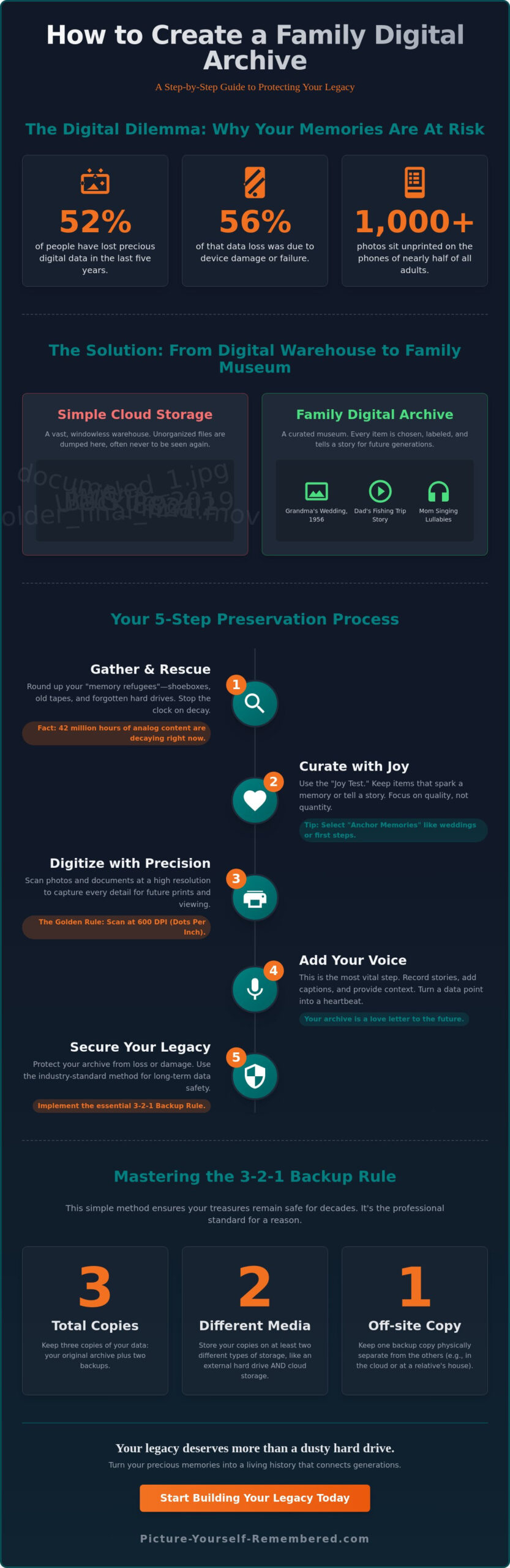
Did you know that 52% of people have lost precious digital data in the last five years, with device damage being the culprit 56% of the time? It’s a heartbreaking thought, especially when 48% of us have over 1,000 photos on our phones that we’ve never even bothered to print. You likely feel the weight of these scattered memories, tucked away in digital corners where they’re easily forgotten or lost. Learning how to create a family digital archive is the first step in protecting that history; after all, trying to organize a lifetime of data can feel a bit like trying to herd caffeinated cats.
We believe your life’s essence deserves better than a cluttered, dusty hard drive. This guide will show you how to transform those disorganized files into a secure, living legacy that your family will cherish for generations. You’ll learn how to move beyond simple storage to true stewardship of your story, gaining peace of mind that your history is safe. We’ll explore the best file formats for endurance, the essential 3-2-1 backup rule, and how to ensure your most cherished narratives are preserved for the children and grandchildren waiting to meet you.
Key Takeaways
- Learn how to create a family digital archive by transforming scattered files into a curated narrative that honors your unique essence.
- Gather your “memory refugees” and use the Joy Test to focus on the stories that truly matter. Quality matters more than quantity.
- Master the 600 DPI scanning rule and the 3-2-1 backup method. These simple steps ensure your treasures remain safe for decades.
- Discover why adding your personal voice is the most vital step in turning a cold hard drive into a living bridge for future generations.
- Find out how to keep your files healthy over time; after all, a legacy that won’t open is just a very expensive digital paperweight.
What is a Family Digital Archive?
A family digital archive is far more than a simple folder of photos on your computer. It is a curated collection of your most precious stories, voices, and documents, gathered with the intention of being shared. Think of it as a digital home for your family’s essence. Unlike a physical attic, this space won’t gather dust or suffer from damp corners. Understanding how to create a family digital archive means moving beyond just saving things. It’s about building a bridge that connects your current life to the generations that will follow.
This process is an intentional act of stewardship. With global data production expected to reach 527.5 zettabytes by 2029, your personal history can easily get lost in the noise. By engaging in Digital Preservation, you ensure that your narrative remains clear and accessible. It transforms you from a passive consumer of technology into a visionary legacy architect. You’re not just keeping files; you’re protecting the light of your family’s influence.
To better understand this concept, watch this helpful video about preserving family history through digital archives:
Digital Archive vs. Simple Cloud Storage
It helps to think of cloud storage as a vast, windowless warehouse. It’s a place where you dump boxes of stuff and hope you can find them later. An archive, however, is a museum. In a museum, every item has a label, a story, and a reason for being there. Dumping 5,000 unorganized photos into a folder is the quickest way to ensure they are never looked at again. Trying to find a specific memory in an unlabeled “Untitled” folder is basically a modern version of an Indiana Jones quest, though usually with less adventure and more frustration.
Actionable tip: Start your archive by selecting only your top ten most meaningful items. Curation is your greatest tool. When you choose less, you actually give those few items more room to breathe and speak. This focus helps prevent the overwhelming feeling that often stops people before they even begin.
The Emotional Value of a Living History
While a photo shows us what someone looked like, a digital archive captures who they were. Hearing the specific lilt of a grandmother’s laugh or seeing a parent’s smile in a video preserves their spirit with a depth that a flat image cannot reach. You are the one who knows the stories behind the faces. By adding your voice and context, you turn a data point into a heartbeat. A digital archive is, at its core, a love letter to the future. It is a way to say “you matter” to people you might never even meet.
Preparing Your Archive: Gather, Sort, and Curate
Understanding how to create a family digital archive begins with a physical scavenger hunt. You must first round up the “refugees” of your history. These are the shoeboxes tucked in the attic, the loose envelopes hiding in the basement, and the forgotten folders on old hard drives. It’s a race against time; Forbes reported in May 2026 that an estimated 42 million hours of analog content, like VHS tapes and cassettes, are currently decaying. By gathering everything now, you stop the clock on that loss and begin the beautiful process of stewardship.
Once your items are gathered, it’s time for the “Joy Test.” Don’t feel pressured to save every single scrap of paper. Instead, keep the items that tell a specific story or spark a vivid memory. If a photo doesn’t make you feel something, it might just be clutter. Organize your chosen pieces by era or person before you even look at a scanner. This pre-sorting saves hours of digital frustration later. As you uncover these treasures, you might feel a desire to share them immediately; a Basic Membership can help you begin that journey of connection.
The Art of Selection
You don’t need to save every blurry photo of Uncle Bob’s elbow from the 1984 barbecue. Focus on “Anchor Memories” instead. These are the weddings, the first steps, and those quiet kitchen conversations that define a family’s soul. If you find “mystery photos” where you don’t recognize the people, set them aside. You can ask older relatives for help later, which often turns into a wonderful storytelling session itself. Remember that 65% of consumers still prefer physical albums for long-term preservation according to WifiTalents; your digital archive is a companion to, not always a replacement for, your most tactile treasures.
Cleaning and Protecting Physical Media
Before you digitize, you must prepare your originals. Create a clean, dust-free workspace and gather simple tools like microfiber cloths, canned air, and cotton gloves. Your hands have natural oils that can damage delicate surfaces, so those gloves are essential for handling old negatives or glossy prints. Never use cleaning fluids on 100-year-old original prints; a dry, gentle touch is always better. Finding a petrified french fry from 1994 stuck between pages of a wedding album is a rite of passage for every family historian, but once the snack is removed, a soft puff of air is all you need to clear the way for a perfect scan.
Digitizing Your Memories Without the Stress
Once you’ve gathered your physical treasures, the transition to digital begins. You face a choice between the hands-on intimacy of DIY scanning and the convenience of professional services. For those with massive collections, companies like Record Family History offered rates as of November 2025 starting at $0.40 per photo or $1.40 per slide. If you choose the professional route, you’re paying for their high-end equipment and time. However, learning how to create a family digital archive yourself allows you to visit with each memory as it passes through the scanner. It’s a slower, more reflective path that many find deeply rewarding.
The “Golden Rule” of this process is your resolution setting. Always aim for at least 600 DPI (dots per inch) for your family prints. While 300 DPI is fine for viewing on a screen, 600 DPI ensures that if a future grandchild wants to enlarge a portrait of you for their own home, the image remains crisp and clear. Think of it as providing the highest quality ingredients for a story that hasn’t been finished yet. High resolution is a gift of clarity you leave for the future.
As you save these files, avoid the temptation to leave them with names like “IMG_001.jpg.” This is the quickest way to lose a memory in a digital black hole. Trying to find a specific photo named “IMG_4829” is like trying to find a specific grain of sand at the beach, but with more clicking and fewer seagulls. Use a descriptive naming convention instead. A simple format like “1975_Summer_Grandma_Garden.jpg” tells a story before the file even opens. This consistency is the backbone of a searchable, living legacy.
DIY Scanning Tips for Beginners
Your smartphone is a powerful tool, and apps like Google PhotoScan are “good enough” for quick captures of documents. However, for cherished portraits, a flatbed scanner is still the gold standard. When scanning slides or negatives, ensure your scanner has a transparency adapter to keep those 1970s colors vibrant. Actionable tip: Always scan the back of your photos! Often, a mother’s handwriting or a faded date on the reverse is just as precious as the image on the front. Capturing both sides preserves the full context of the moment.
Organizing for the Next Century
The best folder structure is one that a ten-year-old could navigate without a manual. We recommend organizing by date and event, such as “YYYY-MM-DD_Event_Person.” This chronological flow mirrors the way we experience life. You don’t need a complex system; you just need one you can stick to. Consistency is far more important than the specific naming style you choose. By adding metadata, which is just digital “tags” for the who, what, and where, you embed the history directly into the file. This way, even if the file is moved, the story travels with it.
The Heart of the Archive: Adding Your Voice
Most people think the work is finished once the scanner stops humming and the folders are neatly labeled. However, a photograph only shows us what a person looked like; it doesn’t capture the cadence of their laughter or the specific way they paused before telling a favorite story. Adding your voice is what transforms a collection of cold files into a living, breathing legacy. When you’re learning how to create a family digital archive, remember that the most valuable file you’ll ever save is a recording of your own story. It’s a bridge built from your words, intended to carry your essence across time. For those seeking inspiration on where to start, our guide on recording messages for loved ones offers a gentle path forward.
This narrative layer is the most overlooked part of how to create a family digital archive. We often assume our children know the “why” behind the “what,” but stories are fragile. By narrating the history behind an old photo, you ensure the context lives as long as the image. It’s about distilling the beauty of a life into a format that can be heard and felt. If you’ve ever tried to record a soulful message only to have the neighbor’s leaf blower start its solo performance at the exact same time, you know that perfection isn’t the goal; authenticity is.
Capturing Oral Histories
Unlocking the best stories from parents or grandparents often starts with simple, evocative questions. Instead of asking for a timeline, ask about their first job or the smell of their childhood kitchen. These small details paint a vivid portrait. Use your phone’s voice memo app in a quiet room, ideally one with soft fabrics like rugs to dampen echoes. One of the most magical techniques is the “narrated photo.” Simply hold a cherished image and record yourself describing what was happening just outside the frame. Who was laughing? What did the air smell like? These details are the heartbeat of your history.
Creating Video Messages for the Future
Regarding video messages, don’t worry about being perfect or having a polished script. A stiff, rehearsed performance often hides the very personality you’re trying to preserve. It’s much better to speak from the heart, even if you stumble over a word. Think of these as time capsule messages for your children or grandchildren. You’re giving them the gift of your presence, even decades from now. This is the true beauty of digital remembrance. To ensure these precious messages are delivered exactly when they are needed most, you can explore the Scheduled Delivery System at Picture-Yourself-Remembered™.
Securing Your Legacy for the Next 99 Years
Building a collection is only half the journey; the other half is ensuring it survives the test of time. To protect your work, we rely on the industry standard known as the 3-2-1 rule. This means keeping three separate copies of your data, stored on two different types of media, with at least one copy kept off-site in a secure cloud environment. Since hardware can be unpredictable, this redundancy isn’t just a technical suggestion. It is a shield for your family’s essence. Learning how to create a family digital archive requires you to think like a long-term guardian rather than a temporary user.
You must also stay vigilant against digital decay. Unlike a physical photo that might slowly fade over decades, digital files can become unreadable in an instant if the hardware fails. Most hard drives have a lifespan of only three to five years before they begin to risk failure. To prevent this, you should refresh your archive every few years by moving your files to new, updated storage. Treating your family history like a game of digital hot potato is the only way to ensure the music never stops for the next generation. Leaving your legacy on a fifteen year old thumb drive is a bit like trusting a toddler with a Faberge egg; it might be fine for a minute, but a disaster is likely looming.
Choosing a Secure Vault
While it’s tempting to post memories on social media, these platforms are poor choices for a permanent home. They often compress your high resolution files, stripping away the quality you worked so hard to preserve. More importantly, you don’t truly own the space. For true preserving family history, you need a vault that prioritizes privacy and long-term accessibility. You deserve the peace of mind that comes from knowing your messages will reach the right people at the precise moment they are needed, rather than being lost in a generic newsfeed.
Final Steps: Making it a Living Archive
A legacy shouldn’t be a static museum; it should be a living part of your family’s life. We suggest setting a Legacy Date once a year, perhaps on a birthday or anniversary, to add new memories and verify that your backups are healthy. This intentional rhythm keeps the process from becoming overwhelming. You can share parts of the archive with your family today to spark joy while keeping your Future Messages tucked away in our Scheduled Delivery System. To see how this all comes together to protect your narrative, you can explore how Picture-Yourself-Remembered™ works. By taking these final steps, you ensure that when you’re gone, your voice remains a steady, loving presence in the lives of those you cherish.
Your Journey as a Legacy Architect Begins Now
You now have the map for how to create a family digital archive, moving from dusty shoeboxes to a secure, living history. By choosing curation over clutter and using the 3-2-1 rule to protect your data, you’ve done more than just save files. You’ve ensured that your essence won’t end up as a nameless face in a digital bargain bin. Remember, a legacy isn’t built in a day; it’s distilled over time, one cherished story at a time. If you still have that one photo of a mystery cousin that no one can identify, don’t worry. Even the best archives have a few unidentified flying relatives.
The most important step is simply to start. With secure storage for up to 99 years and the compassionate guidance of our founder, Stanley Poe, we’re here to help you find emotional fulfillment and peace of mind. Your story is a masterpiece that deserves to be heard by those who haven’t been born yet. Begin your journey by creating your first video legacy message today. Take agency over your narrative and ensure you’re always remembered exactly as you are.
Frequently Asked Questions
How do I start a family digital archive if I have thousands of photos?
Start by choosing just one small batch of memories to focus on today. With 48% of Americans holding over 1,000 photos on their phones according to a 2025 Mixbook survey, the sheer volume can feel like trying to drink from a firehose. Pick ten photos that capture the essence of a single year or a specific person. By focusing on quality over quantity, you avoid the paralysis of choice and begin your journey as a legacy architect without the stress.
What is the best file format for long-term digital preservation?
The Library of Congress Recommended Formats Statement for 2025-2026 suggests using uncompressed TIFF files for the highest quality photo preservation. While JPEGs are acceptable for everyday sharing, TIFFs preserve every detail of the original image without losing data over time. For documents, PDF/A is the gold standard for endurance. If you want to ensure your archive stays accessible for the next 99 years, these professional standards are your best friends.
Can I use my smartphone to scan old family documents?
Yes, your smartphone is a capable tool for capturing documents and casual photos when used with a dedicated scanning app. Apps like Google PhotoScan help reduce glare and straighten edges automatically. While a flatbed scanner is still better for professional-grade results, your phone is perfect for capturing the refugees of your history quickly. Just make sure your lens is clean; a greasy thumbprint can turn a 1920s wedding into a blurry, soft-focus dreamscape.
How often should I back up my digital archive to prevent data loss?
You should verify your backups and refresh your storage at least once a year. Since 52% of people have suffered data loss in the last five years, regular checkups are essential for your peace of mind. Follow the 3-2-1 rule by keeping three copies on two different types of media. Set a recurring “Legacy Date” on your calendar to ensure your digital legacy remains healthy and accessible for the generations waiting to meet you.
What is a digital time capsule and how is it different from an archive?
An archive is a searchable museum of your history, while a time capsule is a message intended for a specific future moment. An archive stays open for family to explore and cherish today. A time capsule, like our Scheduled Delivery System, remains sealed and secure until a date you choose. It’s the difference between a library that’s always open and a surprise gift waiting to be opened on a grandchild’s wedding day.
How do I ensure my digital legacy is passed on to my children?
Naming a digital heir is the most practical way to ensure your archive isn’t locked away forever. Share your master access details with a trusted confidant or use a dedicated service designed for legacy delivery. Without a clear plan, your cherished stories could vanish into the digital ether when your devices fail. Think of it as giving your children the keys to the family home before you depart on a long journey.
Is it better to use an external hard drive or cloud storage for my archive?
The best approach is to use both as part of a redundant system. External hard drives are great for quick access, but they often fail within three to five years of use. Cloud storage provides a vital off-site backup that’s safe from physical damage like fire or floods. By combining physical and digital storage, you create a safety net that respects the gravity and beauty of your life’s narrative.
What happens to my digital archive if the storage company goes out of business?
This is why having your own local copies is a non-negotiable part of how to create a family digital archive. If a cloud provider closes, you’ll need to move your data, which can incur egress fees of up to $0.12 per gigabyte from major providers like AWS or Azure. Always keep a master copy on your own hardware. It ensures you remain the true steward of your story, regardless of changes in the technology world.
