

Imagine your granddaughter in twenty years, holding a small plastic stick she found in a velvet keepsake box. She’s eager to see your wedding day or your first home, but when she plugs it in, the screen stays dark. It’s a heavy thought, but it leads to a vital question: are USB drives safe for long term photo storage? We often treat these tiny gadgets like permanent digital vaults, yet research shows that most flash drives have a reliable lifespan of only about 10 years before the data begins to drift away. They are also remarkably easy to lose; I’ve personally seen more thumb drives vanish into the dark abyss of couch cushions than I have stray socks in the laundry.
You likely feel that a physical backup is the most straightforward way to protect your legacy, and it’s natural to want something you can hold. However, relying on a thumb drive alone might put your most precious memories at risk. I’ll show you how to secure your family’s story for the next century by moving beyond fragile hardware. We will explore the 3-2-1 backup rule and how to handle the April 2026 shift to universal USB-C standards, ensuring your essence remains bright for every generation that follows.
Key Takeaways
- Learn why “bit rot” can turn your cherished family portraits into distorted static and how to spot these silent failures before your memories fade.
- Find out the heartfelt answer to the question: are USB drives safe for long term photo storage, and explore why these convenient tools should only be a temporary stop on your journey.
- Implement a simple “Legacy Audit” every two years to ensure your digital story migrates safely to the newest technology before your current hardware retires.
- Realize why a flash drive is a bit like a temperamental houseplant; it needs occasional power to stay healthy, though thankfully you can’t accidentally overwater your wedding photos.
- Shift your focus from simply storing data to becoming a true steward of your family narrative, ensuring your digital heirlooms are ready to be received by future generations.
Are USB Drives Reliable for Decades? The Uncomfortable Truth
We often treat our digital memories with the same reverence we give to a box of old polaroids tucked away in the attic. We see the sturdy plastic shell of a thumb drive and feel a sense of security. It feels permanent. It feels safe. However, there is a quiet, invisible fragility to these devices that many of us don’t realize until it is too late. While they are wonderful for moving a few files from a laptop to a print shop, they were never designed to be the final resting place for your life’s narrative.
USB drives are like that one friend who enthusiastically promises to help you move but suddenly develops a mysterious back injury the moment it is time to lift the heavy sleeper sofa. They are incredibly helpful in the short term, but they have a habit of disappearing or failing exactly when you need them most. When people ask, are USB drives safe for long term photo storage, the honest answer is that they are more like a temporary bridge than a permanent vault. You might plug a drive in after five years only to find that while the computer recognizes the hardware, your cherished photos have been replaced by gray boxes or error messages.
To better understand why these devices might not be the forever home for your memories, watch this helpful video:
What is Flash Memory and Why Does It Fade?
Inside that plastic casing is something called NAND flash memory. Think of this memory as a vast field of billions of tiny buckets, each holding a small electrical charge that represents a piece of your photo. Over time, these buckets naturally begin to leak. This process, known as charge leakage, happens silently and without warning. If the drive sits in a drawer without power for several years, those buckets eventually empty, and the data simply vanishes. Research into USB flash drive longevity confirms that these devices require periodic “refreshing” by being plugged into a powered port to maintain their integrity.
The Reality of the 10-Year Rule
You may see manufacturers claim that their drives last for 10 years, but this is often an optimistic estimate based on perfect laboratory conditions. In the real world, environmental factors play a massive role. High humidity or the sweltering heat of a summer afternoon in a place like Bettsville can accelerate the degradation of the internal components. In the fast-moving world of technology, “long-term” usually refers to a window of about 5 years. Expecting a single piece of hardware to hold your essence for a lifetime is a risky gamble. To keep your story alive, I recommend setting a recurring calendar alert for every six months to plug in your drives for at least ten minutes; this simple act of stewardship helps keep those electrical “buckets” full and your memories intact.
Understanding Bit Rot and Hardware Failure
There is a quiet grief in opening a digital folder only to find that your favorite portrait of your mother has been sliced in half by a solid gray bar. This isn’t a ghost in the machine; it is a phenomenon called bit rot. While we previously discussed the fading electrical charge, bit rot is the spontaneous flipping of the tiny bits of data that make up your files. A single “1” turning into a “0” can be the difference between a clear smile and a corrupted file that refuses to open. When you wonder, are USB drives safe for long term photo storage, you have to account for this silent decay that happens even when the device is sitting perfectly still.
Beyond the internal data, the physical design of these drives presents its own set of heartaches. The connectors are notoriously fragile, and a single accidental bump while the drive is plugged in can snap the bridge between your computer and your memories. These drives are essentially the digital equivalent of hide-and-seek champions; they love to vanish into the dark abyss of a junk drawer or the back of a couch just when you need them. Plugging it in once a year is a kind gesture, but it doesn’t always stop the march of time or the physical risks of static electricity and losing the tiny drive entirely.
The Science of Silent Corruption
A JPEG file is a tightly packed piece of information. When a bit flip occurs, the computer loses the “map” for that image, resulting in distorted colors or files that simply won’t open. To protect your essence, you can use a tool to generate a “checksum.” Think of a checksum as a unique fingerprint for your folder. If you run a check and the fingerprint has changed, you know the data has been bruised, allowing you to replace the file from a healthy backup before the damage spreads. As you act as a steward for your family story, you might find that securing your video messages through a dedicated system provides the peace of mind that a simple plastic stick cannot offer.
Physical Fragility vs. Digital Endurance
The “lost in a drawer” syndrome is the leading cause of memory loss in the digital age. A 2023 report from data recovery experts suggested that up to 15% of flash drives show some form of corruption after just three years of sitting idle. Heat and moisture also act as slow poisons for the delicate internal circuitry. To extend the life of your physical media, consider these steps:
- Store your drives in anti-static bags to prevent a sudden electrical zap from erasing your history.
- Keep them in a climate-controlled environment, away from the humidity of a basement.
- Label every drive with a physical tag; a mystery drive is often a drive that accidentally gets erased or tossed during a spring cleaning.
True endurance requires more than just a sturdy shell; it requires a plan that respects the weight of the narrative you are trying to preserve for the next century.
USB vs. External Hard Drives vs. The Cloud: A Comparison
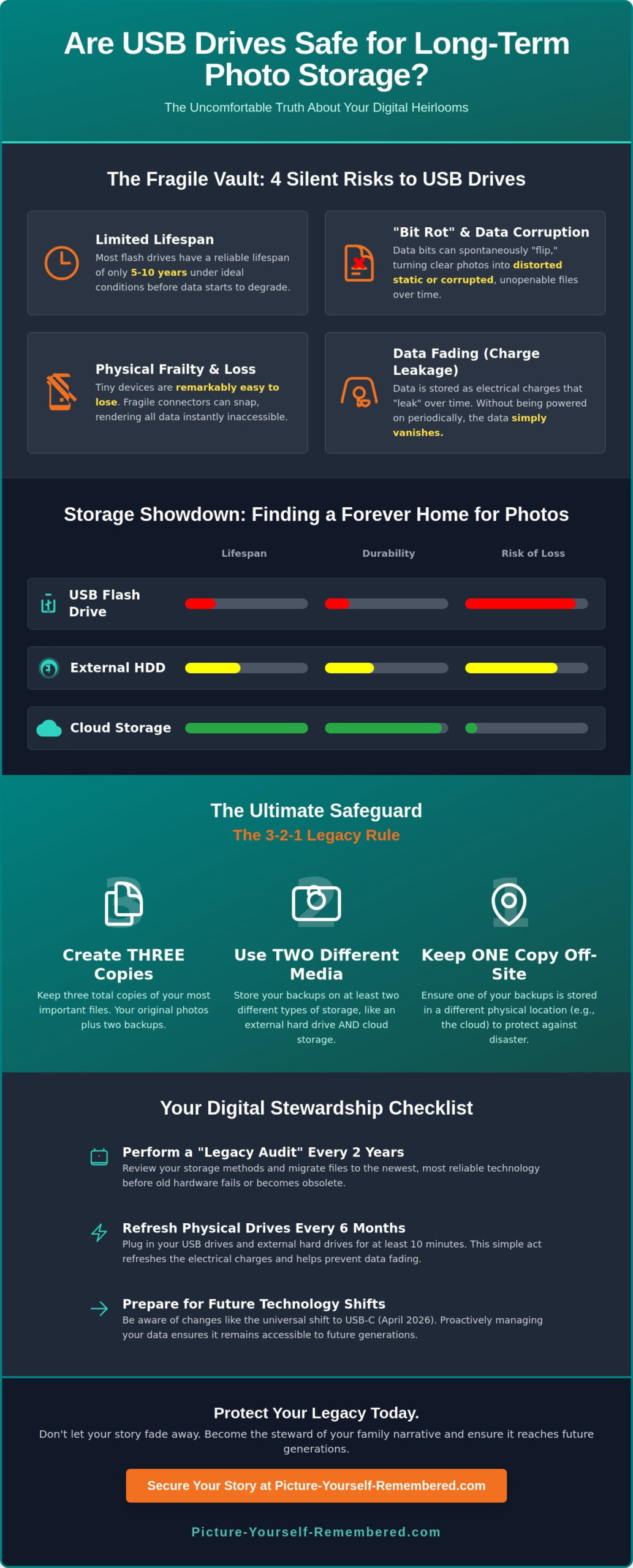
Choosing where to house your digital legacy feels like picking a forever home for your most cherished memories. While we’ve discussed why you might ask are USB drives safe for long term photo storage, it’s helpful to look at the other neighbors in the storage neighborhood. External Hard Disk Drives (HDDs) are the seasoned veterans of the group. They offer massive amounts of space for a lower price per gigabyte, making them excellent for bulk collections. However, they are physically sensitive; a single drop from a coffee table can cause the internal mechanical arm to crash, turning your family tree into a paperweight. Think of an HDD as a delicate glass ornament; it is beautiful and spacious, but it doesn’t handle gravity well.
The Cloud offers a different promise of eternal accessibility. It feels like magic to have your photos follow you from phone to tablet, but this “magic” is really just someone else’s computer in a giant data center. If you forget a password or your credit card expires, those memories can be locked behind a digital gate. In 2026, we’ve seen cloud costs stabilize, but the reliance on a monthly subscription means you are essentially renting your own history. To truly honor your journey, a multi-layered approach is the only way to ensure preserving family history for the next century.
Mechanical Drives (HDD) vs. Solid State (SSD)
Mechanical HDDs use a spinning magnetic platter, much like a tiny, high-tech record player. Solid State Drives (SSDs) use flash chips similar to the ones in your USB drive but with much higher quality and speed. For a “home archive” setup, an SSD is often the wiser choice because it has no moving parts to break during a move or an accidental bump. Bit Density is the reason modern drives are more sensitive than older ones, as they pack billions of pieces of data into spaces smaller than a fingernail. It is a bit like trying to write your entire life story on the head of a pin; it’s impressive, but there isn’t much room for a smudge.
The Cloud: A Subscription to Memory?
When we use standard cloud services, we often overlook what happens when we are no longer here to click “renew.” If a subscription lapses, the corporate servers don’t care about the emotional weight of your narrative. This is where a digital time capsule differs from standard cloud storage, as it is built for endurance and intentional delivery rather than just daily access. Also, consider the hardware itself. With the EU’s April 2026 mandate requiring USB-C for all new laptops, those old USB-A sticks are already becoming digital relics. If you don’t keep up with the hardware, your grandkids might need to visit a museum just to find a port that fits your old drive.
Practical steps for your archive:
- If you use an HDD, never move it while it is plugged in and spinning.
- Check your cloud “Legacy Contact” settings today so a loved one can access your photos if you can’t.
- Invest in a high-quality USB-C to USB-A adapter now, before the older ports disappear from store shelves entirely.
Best Practices for Safeguarding Your Digital Heirlooms
Protecting your essence is about more than just finding a sturdy box; it is about active stewardship. While we have explored why you might wonder, are USB drives safe for long term photo storage, the key to true endurance lies in the 3-2-1 rule. This industry standard suggests you keep three copies of your data, on two different types of media, with one copy stored in a separate location. It creates a safety net that catches your story if one piece of technology fails. Think of it as an insurance policy for your most cherished moments.
To keep your narrative organized, I recommend setting a “Legacy Audit” calendar reminder for every two years. Technology moves quickly, and this simple act ensures you migrate your files to fresh hardware before your current devices decide to retire to a digital nursing home. During this audit, take a moment to rename your files. A photo titled “Grandma_Birthday_1994.jpg” carries much more weight than “IMG_582.jpg.” While digital files are convenient, printing your absolute favorite portraits remains the most future-proof backup. A physical photo doesn’t need a software update or a specific port to be enjoyed by your great-grandchildren.
Implementing the 3-2-1 Strategy at Home
Start by keeping your “working” files on your primary computer for easy access. Next, copy everything to a high-quality external drive that you keep in a fireproof safe. This protects your physical media from household accidents. Finally, use a dedicated legacy service for your most vital messages and stories. This ensures that even if a local disaster occurs, your essence is held safely elsewhere. To begin building this layer of protection, you can start your journey with a Basic Membership today.
The Role of File Formats in Longevity
The way you save your files is just as important as where you store them. JPEG and PDF are the “safest” bets for the next 50 years because they are universal standards. Avoid obscure or proprietary software formats that might go extinct as companies change. If you have “Live Photos” or special smartphone formats, convert them to standard video or image files now. This simple step ensures that the software of 2076 will still be able to read the heart-centered stories you are telling today.
Beyond Hardware: Ensuring Your Story Reaches the Future
We have spent time looking at the technical side of preservation, but the deepest truth is that a photo is only a legacy if it is actually seen and felt by those you love. When we ask, are USB drives safe for long term photo storage, we are usually focused on the health of the hardware. However, we must also consider the health of the connection between generations. There is a very real risk of entering a “Digital Dark Age,” where your family possesses thousands of files on various sticks and drives, yet no one knows the stories behind them or even where the drives are hidden. A USB drive is a bit like a message in a bottle, except the bottle is made of temperamental plastic and the ocean is a cluttered junk drawer.
True stewardship means moving beyond just storing data; it involves guiding a narrative. While a flash drive is a helpful tool for the present, your love is the message that requires a more reliable messenger to reach the future. You are the architect of your own history, and ensuring that your essence survives requires a plan that doesn’t depend on a piece of hardware that might be obsolete by the time your grandchildren are ready to listen. We bridge that gap by transforming the overwhelming volume of digital files into a meaningful act of intentionality.
The 99-Year Vision for Your Family
Imagine the peace of mind that comes from knowing your most cherished reflections are set on a path that spans nearly a century. A scheduled delivery system ensures that your children and grandchildren receive your essence at the exact moments they need it most, regardless of how technology shifts. This approach moves your memories off the fragile “islands” of physical media and into a protected stream of family history. I invite you to record messages for loved ones today, while your voice and your stories are clear and vibrant.
Taking the First Step Toward a Lasting Legacy
The journey toward a lasting legacy doesn’t have to happen all at once. You can begin by simply moving one meaningful photo or video off a dusty USB drive today. This small act of stewardship signals that your story is worth more than a temporary storage solution. A Basic Membership provides a simple, gentle way to start your digital vault and organize your narrative with quiet dignity. Don’t let your life’s masterpiece sit in a drawer where it might be forgotten or lost. You can start your journey into digital legacy with Picture-Yourself-Remembered™ and ensure that your influence remains a light for every generation that follows.
Your Story Deserves a Forever Home
Your life is a masterpiece composed of countless cherished moments, and while technology offers us many tools, it’s clear that the answer to are USB drives safe for long term photo storage is a resounding “not on their own.” We’ve seen how silent bit rot and the April 2026 shift toward universal USB-C standards can leave your physical drives stranded in the past. Relying on a single plastic stick for your legacy is a bit like trusting a chocolate teapot to hold your morning tea; it might look the part, but it’s bound to fail when things get heated. True stewardship requires moving from passive storage to active, heart-centered narrative preservation.
By implementing the 3-2-1 rule and choosing a partner that values your essence as much as you do, you ensure your voice isn’t lost in a junk drawer. You can secure your most precious video memories for up to 99 years with Picture-Yourself-Remembered. With our secure digital vault maintenance and scheduled delivery system, you are not just saving data; you are gifting your future family the light of your influence. Take that first step today and rest easy knowing your story is held in hands that understand its true worth.
Frequently Asked Questions
How long does a USB drive actually last if I don’t use it?
A USB drive sitting in a drawer generally maintains its data for about 10 years, but real-world reliability drops significantly after just 36 months of inactivity. Without an electrical charge to refresh the internal cells, the bits of your story begin to leak away. It’s like leaving a candle in a window; eventually, the details soften and blur until the image is gone. Think of a USB drive as the digital equivalent of a toddler; if you don’t keep an eye on it for five minutes, it’s either lost or broken.
Is an external hard drive better than a USB stick for photos?
External hard drives are generally better for large photo collections because they offer more space, though they are physically more fragile than a USB stick. While a USB stick is convenient for moving files, an external Solid State Drive (SSD) provides a better balance of speed and durability for a home archive. Think of the USB as a temporary suitcase and the external drive as a sturdy wardrobe for your essence. Both require careful stewardship to ensure they don’t fail without warning.
Can I fix a USB drive that says ‘file is corrupted’?
You can sometimes fix a corrupted drive using built-in computer tools like “First Aid” on a Mac or “chkdsk” on Windows, but these are often just digital bandages. If the underlying hardware has failed, professional data recovery is the only path, which can cost upwards of $500. It’s much easier to prevent a heartbreak than it is to mend a shattered digital file. Trying to fix a dead memory chip at home is about as successful as trying to un-toast a piece of bread.
What is the best way to store digital photos for 50 years?
The most reliable way to store photos for 50 years is a combination of the 3-2-1 backup rule and active hardware migration. Because technology shifts so rapidly, you should move your files to new media every 5 to 7 years. When people ask are USB drives safe for long term photo storage for half a century, the answer is only if they are part of a larger, living system of stewardship that outlives the hardware itself.
Do I need to plug in my backup drives occasionally to keep the data alive?
Yes, you should plug in your flash-based backup drives at least once every 12 months to refresh the electrical charge. This simple act of care helps prevent “charge leakage,” keeping those tiny buckets of data full and vibrant. It’s a bit like giving your digital memories a glass of water; they don’t need much, but they can’t survive in a desert forever. Routine check-ups ensure your narrative remains healthy and ready for the next generation.
Will USB ports still exist in 20 or 30 years?
It is highly unlikely that current USB-A ports will exist in 30 years, especially with the April 2026 mandate shifting all new devices to USB-C. Technology evolves in cycles, and the physical shape of our connections changes every decade. To ensure your grandchildren can see your smile, keep a high-quality adapter in your keepsake box, or better yet, move your narrative to a hardware-independent system. Expecting a 2026 port to work in 2056 is like trying to play a vinyl record with a toothpick.
What happens to my digital photos if I pass away?
Without a clear plan, your digital photos often become “orphaned data” that your family cannot access due to encrypted passwords. Many cloud services now offer “Legacy Contacts,” but these can be difficult for grieving loved ones to navigate. Setting up a scheduled delivery system ensures your essence reaches your children exactly when they need it. This transforms a locked folder into a meaningful act of love, ensuring your story is shared with those who will cherish it most.
Is cloud storage safer than physical USB drives?
Cloud storage is generally safer than a single USB drive because it includes automatic backups and professional maintenance that a plastic stick lacks. However, the cloud requires a persistent subscription and a forgotten password can be a permanent wall. When considering if are USB drives safe for long term photo storage, remember that they work best as a local secondary copy rather than your only repository. A multi-layered approach ensures your story is never held hostage by a single point of failure.
