

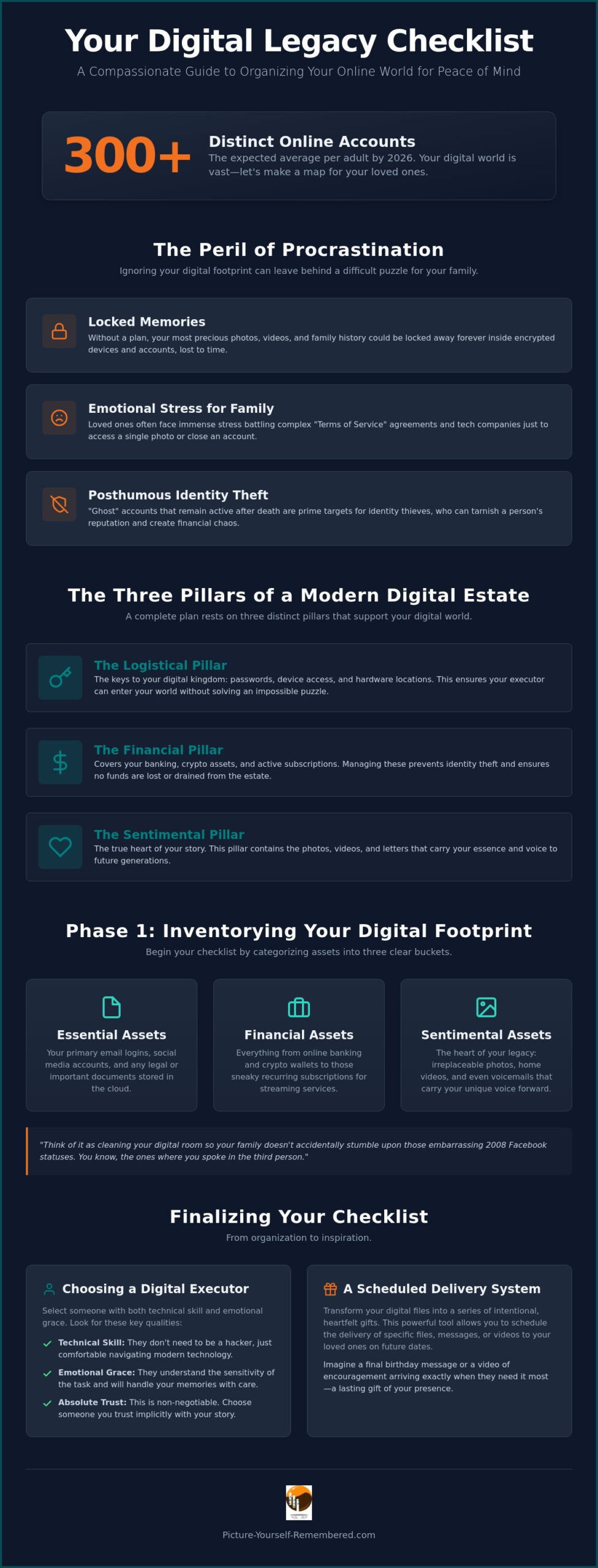
Did you know that by 2026, the average adult is expected to manage over 300 distinct online accounts? It is a staggering number that represents a sprawling library of your most cherished memories, and keeping it all secure requires a thoughtful digital legacy checklist. You might feel a quiet weight in your chest when you think about these accounts, wondering if your family will ever find those precious photos of your first home or if they will be locked away forever. Let’s be honest, trying to remember your own security questions is hard enough, let alone expecting your loved ones to guess the name of your first goldfish, Goldie the Third.
We believe that organizing your digital world should feel like a meaningful act of love rather than a cold administrative task. This guide provides a compassionate path toward profound peace of mind. By following these steps, you will learn how to secure your most important assets and ensure your story is told exactly how you intended. We will explore how to designate your digital heirs and organize your files so your legacy remains a light for those you leave behind.
Key Takeaways
- Learn how to inventory your online footprint by categorizing assets, saving your family from a stressful game of digital hide-and-seek.
- Discover the specific qualities to look for when choosing a Digital Executor to ensure your virtual keys are held with both technical skill and emotional grace.
- Use our compassionate digital legacy checklist to identify and preserve your “emotional assets,” such as those irreplaceable voicemails and videos that carry your unique voice.
- Explore how a Scheduled Delivery System can transform your digital files into a series of intentional, heartfelt gifts that arrive exactly when your loved ones need them most.
What is a Digital Estate Plan (and Why Your Future Self Will Thank You)?
Your digital estate is much more than a simple list of logins and passwords. It is the living, breathing library of your life’s journey. This collection contains every photo you’ve shared, every message you’ve sent, and the quiet digital footprints you leave behind each day. In essence, it is the sum of your online presence and the memories you’ve carefully curated in the cloud. We often think of estate planning as a cold, legal necessity, but digital planning is different. It is a profound act of family kindness. Think of it as cleaning your digital room so your children don’t accidentally find those embarrassing 2008 Facebook statuses where you spoke in the third person and shared every meal you ate.
Understanding the nuances of Digital inheritance helps you see that this isn’t just about bits and bytes. It is about the enduring legacy of your soul. As we move through 2026, the complexity of our online lives requires a more refined approach to digital clutter than in years past. It’s no longer enough to just have a scrap of paper with a few passwords. You need a comprehensive digital legacy checklist that addresses how your assets should be handled, preserved, or even deleted with dignity.
To visualize how these digital pieces fit together and why they matter so deeply, watch this helpful overview:
The Three Pillars of a Modern Digital Estate
A complete plan rests on three distinct pillars that support your digital world. First is the logistical pillar. This includes your passwords, physical devices, and hardware access. Your digital executor needs these keys to enter your world without feeling like they’re solving an impossible puzzle. Second is the financial pillar. This covers your banking, crypto assets, and those active subscriptions that can drain an estate if left unchecked. Managing these prevents identity theft and ensures no funds are lost to the void. Finally, there is the sentimental pillar. This is the true heart of your story. It contains the photos, videos, and letters that carry your essence to future generations. It’s where your voice lives on.
The Risks of Doing Nothing
Choosing to ignore your digital footprint can lead to painful consequences for the people you love. Without a clear digital legacy checklist, your most precious family history could remain locked inside encrypted, inaccessible devices forever. Families often face immense emotional stress when they have to battle complex “Terms of Service” agreements just to see a single photo of a loved one. Additionally, “ghost” accounts that stay active after death are prime targets for identity thieves, which can tarnish a person’s reputation long after they’re gone. Taking action today ensures your story stays secure, and it gives your family the gift of a clear, guided path through your digital life.
Phase 1: Inventorying Your Digital Footprint
Starting your digital legacy checklist feels a bit like opening a dusty attic. Instead of physical trunks, you are looking through folders, apps, and cloud drives. By 2026, the average adult is expected to manage over 300 distinct online accounts. That is a massive amount of digital territory to cover. To make this manageable, we begin with a gentle “digital sweep” of your home and your virtual storage. Simply put, a Digital Asset is any record stored in binary form. To keep your loved ones from feeling overwhelmed, we recommend categorizing these assets into three clear buckets: Essential, Financial, and Sentimental.
Essential assets include your primary email logins and legal documents stored in the cloud. Financial assets cover everything from banking and crypto to those sneaky recurring subscriptions. Sentimental assets are the heart of the matter. These are the photos, videos, and private letters that carry your voice forward. As you organize these pieces, you might realize how much of your essence is captured in these files. If you want to ensure those stories reach the right people at the perfect time, you can see how a Scheduled Delivery System helps to bridge the gap between today and the future.
Hardware and Physical Access
When conducting your inventory, do not overlook the “drawer of old phones” tucked away in your office. These aren’t just e-waste; they are valuable family time capsules containing photos and messages from a younger version of you. List every laptop, tablet, and smart home hub you own. Be sure to note the location of physical security keys or those one-time backup codes for two-factor authentication (2FA). Without these, your digital executor might be locked out of even the most basic accounts. Actionable tip: Label your external hard drives with physical tags today. It prevents your heirs from wondering which drive holds the family wedding videos and which one is just a backup of your 2014 tax returns.
The Cloud and Subscription Audit
Next, move your focus to the virtual world. Make a list of your social media profiles, email accounts, and cloud storage providers like Google Drive and iCloud. Use this time to audit recurring payments for streaming services, gym memberships, or professional software. These can become a financial burden on an estate if they aren’t closed properly. Many major platforms now have built-in tools to help. For example, Apple and Meta (Facebook) allow you to designate a “Legacy Contact” who can manage your account or access specific data after you pass away. Setting these up takes only a few minutes but provides a lifetime of security for your memories.
Phase 2: Choosing Your Digital Executor and Securing Access
Choosing a digital executor is a deeply personal decision that requires a balance of technical skill and emotional grace. This person will act as the steward of your story, holding the virtual keys to your most private and precious files. While a traditional will handles your physical belongings and bank accounts, it often lacks the specific legal language needed to grant access to your encrypted digital life. By 2026, most regions have adopted frameworks like the Revised Uniform Fiduciary Access to Digital Assets Act, but these laws usually require you to provide explicit consent before an executor can see the actual content of your messages or files. Without a designated ally, your family might find themselves locked out by strict platform terms of service that prioritize privacy over inheritance.
Think of this role as a specialized form of guardianship. You want someone who understands that “the cloud” isn’t just a weather pattern and definitely not the cousin who still uses “password123” for their banking. This phase of your digital legacy checklist is about ensuring that your digital assets are managed with the same care as your physical heirlooms. By naming a digital executor, you provide a clear path for your loved ones to navigate the complexities of your online world without the added weight of legal battles or technical frustration.
Why You Need a Tech-Savvy Ally
It is helpful to distinguish between your legal executor, who manages your financial estate, and your digital executor, who preserves your memories. Your digital ally needs the technical literacy to navigate two-factor authentication and the emotional resilience to curate years of personal history. When you sit down to have “The Conversation,” frame it as an invitation to help you preserve family history. Explain that their role is to ensure your voice continues to be heard and that your most important messages reach their intended recipients. This transition from a technical task to a meaningful act of love makes the request feel like a shared mission rather than a burden.
Tools for Secure Handover
The most effective way to grant access is through a master key. Password managers are excellent for this because they offer “Emergency Access” features that allow a trusted contact to request entry after a specified period of inactivity. This creates a secure, automated bridge for your executor. However, technology can sometimes fail, so a physical backup is equally important. Actionable tip: Write down your primary device passcode (for your phone and laptop) on a physical card and store it in a fireproof home safe. This simple step ensures that even if a digital system glitches, your executor has the physical access needed to begin following your digital legacy checklist and honoring your final wishes.
Phase 3: Curating Your Emotional Legacy and Digital Heirlooms
Now that we have organized the logistical keys, we can turn our attention to the true heart of your digital legacy checklist. This phase is about the “Emotional Assets” that carry your unique essence. These are the voicemails that make a loved one smile, the videos where your laughter rings out, and the letters that offer guidance long after they were written. While your bank accounts are important, your family will treasure a single recording of you telling a childhood story far more than a spreadsheet of passwords. Honestly, I promise nobody needs to see the 47 blurry shots of your cat sleeping in a sunbeam, but they will desperately want to see the way your eyes crinkle when you talk about your favorite book.
This is why creating a digital time capsule is perhaps the most valuable part of your entire plan. It moves beyond simple data storage and becomes a curated gift of your life’s wisdom. Instead of leaving behind an unorganized “file dump” of thousands of photos, focus on a “Best Of” collection. Think of it as a gallery of your most meaningful moments rather than a cluttered warehouse of every digital scrap you’ve ever saved. Taking agency over this narrative allows you to decide how you want to be perceived by the generations that follow.
The Power of Video Messages
Hearing your voice is one of the greatest gifts you can leave behind. It provides a sense of presence that a still photo simply cannot match. You might record messages for future wedding days, milestone birthdays, or just simple “Tuesday morning” advice for your grandchildren. These videos bridge the gap between the present and the future, ensuring your influence remains a steady, comforting light. Actionable tip: Start small. Take your phone today and record one 2-minute video sharing your favorite childhood memory. It doesn’t need to be perfect; it just needs to be you. To make sure these messages reach their destination safely, you can explore our Video Message Storage and Scheduled Delivery System.
Organizing Sentimental Media
To keep these treasures safe, create a dedicated “Legacy Folder” in your primary cloud storage account. This central hub makes it easy for your digital executor to find exactly what matters most. As you add items, remember the importance of “Metadata.” This is just a fancy word for context. A photo is just an image, but a photo with a note explaining who is in it and why that day was special becomes a family heirloom. We encourage you to create a video legacy to provide this vital context. This ensures that when your heirs look through your digital photos, they aren’t just seeing faces; they are hearing the stories that make those faces part of their own history.
Finalizing Your Checklist: From Organization to Inspiration
Completing your digital legacy checklist is a transformative journey that turns a sea of data into a structured sanctuary for your soul. You’ve moved from the technical inventory of your devices to the heart-centered curation of your most precious memories. Now, it’s time to bring these elements together into a cohesive plan that breathes with life and intentionality. To ensure your efforts aren’t lost to the shifting sands of technology, we’ve distilled this process into five final, actionable steps:
- Verify Your Inventory: Ensure your list of Essential, Financial, and Sentimental assets is current.
- Test Your Master Key: Confirm your digital executor can access your password manager or physical emergency kit.
- Finalize the Legacy Folder: Double-check that your “Best Of” photos and videos are clearly labeled with context.
- Secure Your Vault: Move your curated assets into a platform designed for long-term endurance.
- Schedule Your Deliveries: Set the specific dates or milestones when you want your messages to be received.
By the time your great-grandchildren watch your videos, they might be using holographic projectors or neural links, but your voice will still be the most high-tech thing in the room. It’s like sending a letter through time, only without the risk of the post office losing it for forty years behind a dusty radiator. Our Scheduled Delivery System bridges the gap between the moment you record a memory and the future day your loved ones need to hear it most, ensuring your presence is felt during life’s biggest milestones.
The Set-It-and-Forget-It Strategy
One of the greatest hurdles in digital planning is the fear that technology will outpace our preparations. To combat this, we utilize a 99-year storage and delivery protocol for your vault. This long-term approach provides the security you need to truly set it and forget it, knowing your messages are held in a space of quiet dignity. A robust digital remembrance strategy isn’t just about storage; it’s about the guaranteed delivery of your essence across decades. Picture-Yourself-Remembered™ bridges the gap between today’s recording and the moment your family needs to hear from you most.
Your 15-Minute Weekly Legacy Habit
If the full digital legacy checklist feels daunting, try breaking it down into micro-tasks. Dedicate just fifteen minutes a week to your legacy. This week, you might just organize your passwords. Next week, you could record a single two-minute video for a grandchild. The emotional reward of knowing your story is safe and accessible is profound. It replaces the anxiety of being forgotten with the calm of being prepared. We invite you to Discover how Picture-Yourself-Remembered™ works for your family and see how easy it is to start today. Your story is a masterpiece worth preserving, and the best time to secure the first brushstroke is right now.
Your Story Deserves a Lasting Home
You have learned how to sweep your digital attic and choose a trusted ally to hold your virtual keys. Most importantly, you have seen that your digital legacy checklist is truly about preserving the heartbeat of your family story rather than just managing a list of logins. After all, you want to be remembered for your wisdom and warmth, not for that one time you accidentally replied-all to a company-wide email with a picture of your burnt toast. Taking these small steps today transforms your digital footprint into a curated gallery of love.
Stanley Poe founded Picture-Yourself-Remembered™ with a mission to bridge generations using a compassionate, non-technical interface that anyone can navigate with ease. Our secure 99-year delivery protocol ensures your most precious messages are held in a space of quiet dignity until the perfect moment arrives. You have the power to take agency over your narrative and give your loved ones the enduring gift of your voice. Begin your legacy with a Basic Membership today. Your influence is a masterpiece, and we are here to help you preserve it for the ages.
Frequently Asked Questions
Is digital estate planning legally binding?
Digital estate planning is legally binding when it follows the framework of the Revised Uniform Fiduciary Access to Digital Assets Act, which has been adopted in 48 U.S. states as of early 2026. This law allows you to grant fiduciaries legal authority to manage your virtual assets. However, simply writing a list of passwords isn’t enough; you must provide explicit consent in a will or trust to ensure your heirs have the legal right to see your private communications.
What happens to my social media accounts if I don’t have a plan?
Without a plan, your social media accounts often enter a state of digital limbo or are permanently deleted according to the platform’s terms of service. Meta and Apple allow you to designate legacy contacts, but if you haven’t set these up, your family may be locked out entirely. This can lead to the heartbreaking loss of years of photos and stories. It’s like leaving your life’s diary in a safe that nobody has the combination to, which is much less romantic than it sounds in movies.
How do I securely share passwords with my digital executor?
The most secure way to share passwords is through a reputable password manager with an “Emergency Access” feature. This allows your digital executor to request access to your vault after a set period of inactivity. Alternatively, you can store a physical master key or recovery codes in a fireproof home safe. Avoid sending passwords via email or text, as these are vulnerable to hackers who would love to know your secret sourdough recipe as much as your banking details.
Can I schedule a video message to be delivered 20 years from now?
You can absolutely schedule video messages for future delivery using a specialized Scheduled Delivery System. This technology allows you to record a message today and ensure it arrives for a milestone two decades away, such as a grandchild’s wedding or graduation. It bridges the gap between generations, allowing your voice and wisdom to be a steady light long after the recording. This is the heart of your digital legacy checklist, transforming data into an enduring gift.
What is the difference between a digital vault and cloud storage?
While cloud storage is designed for active, daily file access, a digital vault is focused on long-term preservation and intentional delivery. Cloud services like Google Drive or iCloud are excellent for syncing documents, but they don’t have built-in protocols to transfer ownership after you pass away. A vault acts as a secure, dignified sanctuary for your most precious assets, ensuring they are protected by a 99-year delivery protocol rather than just sitting in a folder indefinitely.
Do I need a lawyer for a digital estate plan?
You don’t strictly need a lawyer to create a plan, but consulting one can help ensure your digital wishes are legally enforceable alongside your traditional will. Many people use a digital legacy checklist to organize their assets independently and then share that list with their legal counsel. This approach keeps the process affordable while ensuring that your executors have the legal authority they need to handle accounts that are otherwise protected by strict privacy laws.
How often should I update my digital estate checklist?
It is best to review your digital plan once a year or whenever you experience a significant life transition, such as a marriage or a major tech upgrade. Our digital footprints grow quickly, and an outdated list can be just as frustrating for your heirs as no list at all. Think of it as a seasonal cleaning for your soul. It only takes about fifteen minutes to ensure your virtual keys still work and your newest memories are safely tucked away.
What are the most important digital assets to protect first?
Your primary email account should be your first priority because it acts as the gateway to almost every other service you use. After securing your email, focus on financial accounts and sentimental assets like your photo library. These are the pieces of your life that are hardest to recover if lost. Protecting these first ensures that your legacy is secure from the start, leaving you free to focus on the more creative and joyful parts of your story.
