
What if the digital footprints you’re leaving today simply vanished before your grandchildren were old enough to follow them? It’s a quiet fear many of us carry, especially as we realize that a lifetime subscription to a cloud service often just means the lifetime of the company, not your own. Finding the safest way to store digital memories shouldn’t feel like a high-stakes game of hide-and-seek with your own history. You deserve to know that your most precious video messages and photos are resting securely, waiting for the moment they’re meant to be seen.
We understand that the technical world can feel cold and overwhelming, like trying to program a VCR in 1995 while your entire family watches and judges you. You likely want a plan that is both deeply meaningful and refreshingly simple. This guide will show you how to protect your legacy from digital decay and the confusion of forgotten passwords. We’ll explore a set it and forget it approach that ensures your voice and your light reach future generations with perfect clarity and intentionality.
Key Takeaways
- Understand how to guard your family stories against “bit rot,” ensuring your digital files don’t quietly fade away like a pair of acid-wash jeans from the 80s.
- Master the 3-2-1 rule, a simple yet powerful strategy widely recognized as the safest way to store digital memories across multiple locations.
- Apply the “Grandchild Test” to your media, transforming a cluttered hard drive into a curated narrative that future generations can easily navigate.
- Solve the “final hand-off” problem by establishing a delivery plan that ensures your messages reach their destination without the hurdle of locked accounts.
- Discover how an active maintenance approach keeps your digital legacy breathing and accessible for 99 years and beyond.
Understanding the ‘Digital Dark Age’ and Why Storage Fails
When you click “save” on a video of your daughter’s first steps or a photo of your parents’ wedding day, it feels like you’ve tucked those moments away in a safe, permanent vault. However, digital memory storage is far more than just holding onto a file; it’s a commitment to a living story. Many experts fear we are entering a “Digital Dark Age,” a period where our current records may become unreadable for future generations because the technology we use today is so ephemeral. It’s completely natural to feel a sense of worry when you think about your family history sitting on a device that might not even turn on in five years.
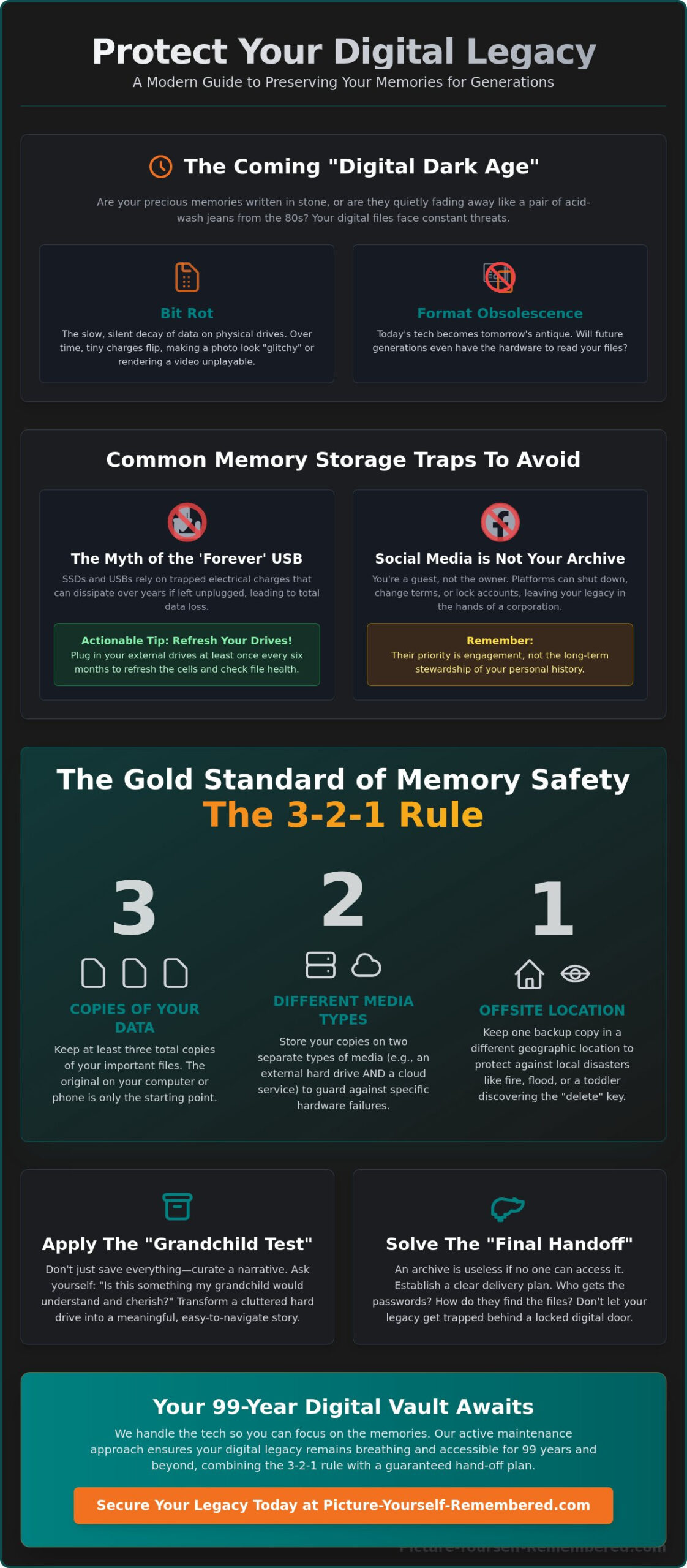
The reality is that digital data isn’t written in stone. It’s more like writing in the sand at the edge of a rising tide. Two main forces threaten these memories: bit rot and format obsolescence. Bit rot is the slow, silent decay of data on physical drives, where the tiny magnetic or electrical charges that make up your files begin to leak or flip. Over time, this makes a photo look “glitchy” or renders a video unplayable. When you combine this with the fact that software changes rapidly, you realize that the Digital Preservation of your life’s work requires a more intentional approach. If we don’t act with care, the safest way to store digital memories will remain a mystery to those who need them most.
To better understand the challenges of keeping your digital history alive, watch this helpful video:
The Myth of the ‘Forever’ USB Drive
Many of us have a “memory drawer” filled with colorful USB sticks and external hard drives. While convenient, flash memory and Solid State Drives (SSDs) aren’t designed to hold data for decades without help. SSDs, in particular, rely on trapped electrical charges to store your files. If they sit “unplugged” in a closet for several years, those charges can dissipate, leading to total data loss. Finding a working USB-A port in 2076 will likely be as difficult as finding a payphone or a teenager who actually wants to talk on the phone today. Actionable Tip: If you use external drives, plug them into a power source at least once every six months to “refresh” the electrical cells and check for file health.
Why Social Media is Not a Safe Archive
It’s tempting to think that because your photos are on Facebook or Instagram, they’re safe forever. In truth, you don’t actually own the data on these platforms; you’re simply a guest in their digital house. Platforms can close, terms of service can change, and accounts often become inaccessible after a loved one passes away. Relying on a social media giant is rarely the safest way to store digital memories because their priority is engagement, not the long-term stewardship of your personal legacy. Your history is too precious to be left to the whims of an algorithm or a corporate merger.
The 3-2-1 Rule: The Gold Standard of Memory Safety
When we talk about preserving the essence of a life, we often think of the weight of a physical photo album or the scent of an old letter. In the digital world, that weight is replaced by data, which is far more fragile than we care to admit. To protect your story, experts rely on a simple, rhythmic philosophy known as the 3-2-1 rule. It is widely considered the safest way to store digital memories because it builds a fortress of redundancy around your most cherished moments. By following this practice, you ensure that no single accident, hardware failure, or natural disaster can erase the evidence of your journey.
The rule is easy to remember and even easier to implement. You should have at least three copies of your data. The original on your phone or computer is never enough; it’s just the starting point. You then store those copies on two different types of media, such as a physical drive and a cloud service. Finally, keep one copy offsite. If a fire or flood affects your home, your memories remain safe in a different geographic location. Organizations like The Signal from the Library of Congress emphasize that active management is the heartbeat of preservation. This layered approach transforms a chaotic collection of files into a secure, lasting legacy.
Choosing the Right Cloud Provider
Not all clouds are created equal. Active cloud services like Google Drive or iCloud are wonderful for daily access, but they often prioritize syncing over true long-term archiving. For a deeper level of protection, you might consider “cold storage” options like Backblaze or AWS, which act more like a digital vault where files are tucked away for years. These services use high-level encryption to wrap your memories in a protective layer that only you can peel back. Actionable Tip: Check your settings to see if your cloud is “syncing” or “backing up.” If you delete a photo from your phone and it disappears from the cloud, you’re syncing, not backing up. A true backup keeps the file even if the original is gone.
The Role of External Hard Drives Today
While the cloud offers convenience, having a physical copy you can hold provides a unique sense of peace. For long-term storage, traditional Hard Disk Drives (HDDs) are often preferred over Solid State Drives (SSDs) because they are less likely to lose data when left unpowered for long periods. Choosing a drive is a moment for quality. A cheap hard drive is like a cheap umbrella; it’s only there to let you down when it actually starts raining. Actionable Tip: Mark your calendar for a “health check” every two years. Plug in your external drives, ensure the files open clearly, and move them to a new drive every five to seven years to stay ahead of hardware aging. If this feels like a heavy lift, exploring a Scheduled Delivery System can help automate the most vital parts of your legacy plan.
Organizing Your Legacy for the Next Century
Organization is often mistaken for a mere household chore, but when it comes to your life’s story, it is a vital form of security. A file that cannot be found or identified is effectively lost to the sands of time. Even the most robust technical backup fails if the person receiving the memories doesn’t know what they are looking at or why it matters. Truly finding the safest way to store digital memories means ensuring those memories remain recognizable, accessible, and deeply meaningful long after the original context has faded.
We often fall into the trap of “information overload,” believing that saving every blurry photo or five-second clip is the best way to honor our journey. In reality, curation is an act of love. By selecting the most resonant moments, you make it much easier for your descendants to connect with your true essence without having to sift through thousands of digital “junk” files. When you are preserving family history, you are acting as the intentional curator of your own masterpiece. Always apply the “Grandchild Test” to your files: if a stranger or a grandchild found this video in the year 2099, would they understand the love and history behind the person on the screen?
File Naming for Future Generations
Standard names like “IMG_4022.mp4” are digital dead ends that offer no clues to the future. Your great-grandkids won’t know if a file named “Dad_Funny_Face” is their beloved ancestor or just a random neighbor who wandered into the frame during a backyard barbecue. This lack of clarity can lead to precious files being deleted during a future digital “spring cleaning.”
Actionable Tip: Adopt a universal naming convention like YYYY-MM-DD_Who_What. For example, “2024-06-12_Grandpa_Joe_Advice_on_Marriage.mp4” provides immediate, searchable context that survives even if your folder structure is lost. This simple habit is a cornerstone of the safest way to store digital memories because it embeds identity directly into the file’s title.
The Power of Metadata and Descriptions
Metadata is a term for the “hidden story” tucked inside a file’s properties, allowing you to add titles, tags, and descriptions that stay with the media wherever it goes. Think of it as writing on the back of a physical photograph, but in a way that never fades. Creating a simple “Read Me” text file to sit inside your main archive folder can also serve as a compass for those who inherit your digital vault.
Actionable Tip: Write a brief, two-sentence summary for every major video message you save. Explain who is speaking, what the occasion was, and why you wanted them to hear these specific words. This layer of narrative transforms a cold digital file into a warm, living connection that can be felt across the generations.
The Missing Link: How Memories Actually Reach the Future
Even with the most meticulous backups and organized folders, a vital question remains: who will actually carry these memories across the finish line when you are no longer here to hold the torch? This is the “Final Objection” that keeps many of us awake at night. We often assume that our loved ones will simply find our hard drives or guess our passwords, but grief is a heavy fog. In that state, searching through a sea of digital files is often the last thing a family can manage. To find the safest way to store digital memories, we must look beyond the storage itself and focus on the delivery.
Many major tech platforms now offer “Digital Inheritance” settings, but these are often buried in complex menus and can be quite difficult for survivors to navigate. These systems usually focus on account access rather than the heart of the message. This is why creating a digital time capsule is a far more reliable approach than leaving behind a standard folder. A capsule is a vessel of intent, designed to protect your story from being lost in the noise of a standard cloud account or a locked laptop that no one can open.
Scheduled Delivery vs. Passive Storage
There is a profound difference between leaving a “box of files” and setting up a scheduled message. Passive storage waits for someone to come looking for it, which may never happen if the password is lost. A Scheduled Delivery System, however, acts with purpose. It ensures that your voice arrives exactly when it is needed, whether that is a 21st birthday, a wedding day, or a quiet afternoon ten years from now. It’s like a slow-cooker for your soul; you set the intention now, and it’s warm and ready when they need it most. This proactive approach takes the burden of “finding” off your family and replaces it with the joy of “receiving.”
Legal and Ethical Considerations
While we don’t handle legal estate planning, we strongly encourage you to think of your digital life as a part of your overall legacy. Designating a “Digital Executor” in your wishes can provide a clear, gentle path for your family to follow. This person doesn’t need to be a tech genius; they just need to be the keeper of the plan. Understanding how picture yourself remembered works can help you see how a structured system bridges the gap between today’s technology and tomorrow’s connection. If you are ready to secure your place in your family’s future, you can start your legacy journey today by choosing a path of intentionality and peace.
Picture-Yourself-Remembered: Your 99-Year Digital Vault
The journey of preserving your story began with understanding the risks of the “Digital Dark Age” and the necessity of the 3-2-1 backup rule. However, even the most disciplined individual can find it difficult to maintain a complex digital archive for nearly a century. This is where our philosophy of dignity and connection transforms a technical task into a meaningful legacy. We believe that the safest way to store digital memories isn’t just about finding a shelf for your files; it’s about providing a “digital heartbeat” that keeps your story alive and healthy long after you’ve finished telling it.
Our Active Maintenance model is specifically designed to fight the bit rot and silent decay we discussed earlier. While a standard hard drive might sit in a drawer and slowly lose its data, our system constantly monitors the health of your files. We move your memories to fresh hardware and updated formats before the old ones have a chance to fail. When you choose to create a video legacy with us, you aren’t just uploading a file. You’re entrusting your voice to a 99-year promise that ensures your light will bridge the generational gap and shine clearly for those who haven’t even been born yet.
How Our Secure Storage Works
We take the complexity of high-level security and make it feel like a warm embrace. Your memories are protected using multi-server redundancy, which simply means your files exist in several secure locations at the same time. If one server has a hiccup, the others are there to hold the line. We also use advanced encryption to wrap your messages in a private shield that only your designated recipients can open. We’re like the Secret Service for your family stories, but with better smiles and a lot more heart.
Actionable Tip: Don’t feel like you have to document your entire life in a single weekend. Start by using our Video Message Storage for just one “Future Message” to a child or grandchild. Once you experience the peace of mind that comes from knowing that single message is secure, the rest of the process will feel natural and inviting.
The Gift of Being Heard
Imagine a child, decades from now, sitting down on a milestone birthday and hearing the steady, loving voice of a parent who is no longer with them. This is the ultimate goal of the safest way to store digital memories. Our Basic Membership provides a simple, structured path to ensure these moments aren’t lost to forgotten passwords or broken laptops. By using our Scheduled Delivery System, you take agency over your narrative and ensure your influence continues to guide and comfort your family. Your history is a masterpiece, and we’re honored to help you preserve it with the artistry and care it deserves. Begin your journey of remembrance today.
Your Story is a Masterpiece Worth Protecting
We have walked through the quiet threats of bit rot and the simple, rhythmic power of the 3-2-1 rule. You now know that preserving your history requires more than just a hard drive in a drawer; it requires an intentional plan for both organization and delivery. Embracing the safest way to store digital memories means moving from a state of worry to a state of peaceful preparedness. It’s about ensuring that your laughter and your wisdom don’t just exist as data, but as a living connection for your family.
Founded by Stanley Poe with a mission of deep generational connection, our service offers secure digital vault maintenance and 99-year delivery protocols. Think of it as a time machine for your heart, minus the confusing paradoxes or the need for a flux capacitor. You can take agency over your narrative right now. Secure your legacy with a Picture-Yourself-Remembered membership today. Your voice is a unique gift, and we are here to help you ensure it echoes with love for generations to come.
Frequently Asked Questions
Is cloud storage safer than an external hard drive?
The most secure approach isn’t choosing between the cloud or a hard drive, but rather using both to create a safety net for your history. Cloud storage offers protection from local disasters like floods, while a physical drive ensures you have a copy you can hold in your hand. This redundancy is the safest way to store digital memories because it removes any single point of failure. It’s like wearing both a belt and suspenders; you might look a bit extra, but your legacy certainly isn’t going anywhere.
What happens to my digital memories if a storage company goes out of business?
Reputable providers generally have data portability protocols, but the risk of a company closing is why you should never rely on just one platform. This is why we advocate for a multi-layered approach that includes local copies and specialized legacy services. Choosing a provider with an “active maintenance” model means they are committed to the long-term stewardship of your data. Always keep a secondary backup of your most vital video messages in a location you control personally.
How often should I update my digital backups?
You should perform a “health check” on your physical drives every two years and review your cloud settings at least once a quarter. Technology moves with a rapid, sometimes unforgiving pace, and staying ahead of it prevents your files from becoming unreadable “ghosts” of the past. Set a recurring calendar reminder for a “Digital Spring Cleaning” to ensure your files are still opening correctly. Moving your data to new hardware every five years is a wise practice for endurance.
Can I store video messages for 50 or 99 years?
Yes, you can store video messages for 99 years if you use a service specifically designed for generational delivery. Standard consumer drives aren’t built for this timeline, but specialized systems use active management to bridge the gap between today’s tech and the future. This is arguably the safest way to store digital memories because it ensures the files are regularly updated to match the video formats of the next century. It’s about creating a bridge, not just a box.
What is ‘bit rot’ and can it be prevented?
Bit rot is the silent, slow decay of data on a drive, but it can be prevented through a process called “data scrubbing” or active maintenance. This involves software checking your files for tiny errors and automatically repairing them or moving them to healthy hardware. To help prevent this at home, plug in your external hard drives at least twice a year. This simple act refreshes the electrical charges that hold your data in place, keeping the “ink” of your digital story from fading.
How do I make sure my family can access my files after I pass away?
The most reliable method for ensuring access is using a Scheduled Delivery System that sends access details directly to your loved ones when the time is right. Relying on family members to guess passwords or find a hidden USB drive often leads to precious stories being lost forever. By setting up an intentional hand-off, you remove the technical burden from your grieving family. This allows them to focus on your message rather than the frustration of a locked screen.
Are digital time capsules better than physical ones?
Digital time capsules are often superior because they don’t suffer from physical rot, mold, or the risk of being buried and forgotten in a backyard. They allow you to share high-quality video and audio that captures your true essence in a way a dusty shoebox never could. A digital version is also easier to duplicate, meaning you can share the same beautiful legacy with multiple branches of your family tree simultaneously. It’s a more inclusive way to be remembered.
How much storage do I really need for family videos?
Most families find that 10GB to 50GB is more than enough for a lifetime of high-quality, curated video messages. You don’t need to save every blurry second of raw footage to be remembered well; focusing on the most meaningful stories is what truly matters. By selecting your most impactful moments, you ensure your archive is a treasure rather than a chore for your grandchildren to sift through. Quality always speaks louder than quantity when it comes to a lasting influence.
