

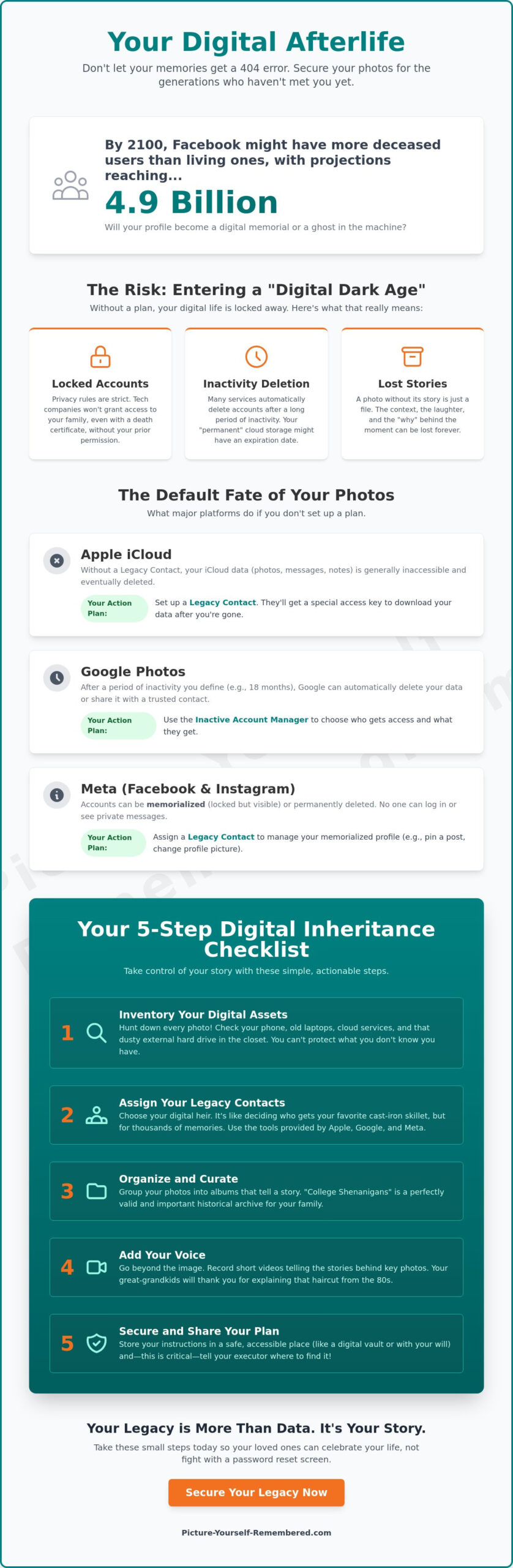
By the year 2100, the number of deceased users on Facebook could reach over 4.9 billion, potentially outnumbering the living on the platform. It is a staggering thought that our digital footprints might one day become more crowded than our physical ones. You likely have thousands of memories tucked away in the cloud, and it’s completely natural to wonder what happens to your digital photos when you die. Will they remain a vibrant window into your life, or will they simply vanish into a locked server? Because let’s be honest, you probably don’t want your great-grandchildren’s first impression of your legacy to be a 404 error page.
It’s understandable to feel a bit overwhelmed by the technical hurdles or anxious about the privacy of your accounts. You want to ensure your family can see the laughter and the milestones without having to fight a password reset screen during their time of grief. This guide will help you discover the hidden fate of your digital memories and show you how to secure your visual legacy for generations to come. We will walk through the simple, intentional steps you can take today to move from technological uncertainty to a clear plan for digital inheritance. You’ll learn how to navigate specific platform tools and organize your story so your loved ones can focus on your influence rather than the stress of a locked device.
Key Takeaways
- Uncover why digital ownership is often an illusion and how you can prevent your life’s work from vanishing into a “Digital Dark Age.”
- Discover what happens to your digital photos when you die by exploring the specific legacy settings offered by major tech companies to keep your family connected.
- Master a simple five-step checklist to inventory your memories and assign legacy contacts before your passwords become a permanent family secret.
- Bridge the gap between a silent image and a living legacy by using video storage to narrate the stories behind your most precious milestones.
- Take these small steps today so your heirs can focus on your beautiful life instead of trying to hack into your old tablet to find that one perfect photo.
The Digital Dark Age: Why Your Photos Might Vanish When You Do
Imagine a cedar chest filled with old, sepia-toned photographs. It sits quietly in a hallway, waiting for a curious grandchild to lift the lid and discover the faces of their ancestors. In our modern world, that physical chest has been replaced by sleek smartphones and invisible cloud servers. While this feels efficient, it creates a quiet risk known as the Digital Dark Age. This term describes the very real possibility that our personal histories could be erased because they are trapped behind locked accounts and forgotten passwords. It is a heavy thought to realize that the vibrant images of your wedding day or your child’s first steps aren’t exactly “owned” by you. Most digital files are actually licensed, meaning the platforms often prioritize privacy over family access unless you have made a clear plan.
To better understand the journey of your digital assets, watch this helpful video:
When we talk about Digital inheritance, we are really talking about how to pass on the light of your influence. It is about more than just data; it is about your digital estate. This isn’t just a legal concept; think of it as a digital home you have built, filled with the visual stories of your life. If you don’t leave a map for your loved ones, that home might stay locked forever. Honestly, some people put more thought into who gets their favorite cast-iron skillet than who gets their fifteen years of vacation photos. By taking intentional steps now, you can transform a complex technical hurdle into a final act of love for your family.
The Myth of Cloud Permanence
We often assume the “cloud” is a forever place where memories stay safe without effort. However, most major platforms have inactivity policies that can lead to automatic account deletion after a certain period of silence. A password alone isn’t a reliable inheritance plan; it can be lost, changed, or even blocked by security protocols. Even physical hardware has its limits. Old external drives and phones are surprisingly fragile, and they can fail just when someone tries to look back at them. Understanding what happens to your digital photos when you die starts with recognizing that digital storage requires your active participation and care.
Why a Photo Without a Story is Just a File
A photograph captures a moment, but your voice provides the soul. Imagine your great-grandson finding a photo of you laughing at a summer picnic. Without context, it is just a stranger in a vintage outfit. Who was making you laugh? What was the secret ingredient in that famous potato salad? When you take agency over your narrative, you become the curator of your own history. You aren’t just saving files; you’re preserving the “why” behind the “what.” Ask yourself: how do I want to be perceived by those who haven’t met me yet? Your photos deserve to be more than just bits of data; they deserve to be the chapters of your story.
The Default Fate: What Apple, Google, and Meta Do with Your Data
When we think about our digital lives, we often imagine our photos living in a sort of eternal gallery. We trust the companies that make our devices to keep those memories safe, but their primary commitment is to privacy, not necessarily to your family’s access. Big Tech is incredibly talented at selling you a phone that recognizes your face; however, they aren’t always so great at recognizing your family’s heart once that face is no longer there to unlock the screen. Without an intentional plan, the answer to what happens to your digital photos when you die is often a frustrating wall of security protocols that even the most determined heirs cannot bypass.
These platforms operate under strict terms of service that view your data as yours alone. When a user passes away without setting up specific permissions, the default action is often to keep the account locked or eventually delete it due to inactivity. This is done to protect your privacy, but it can leave your loved ones in a painful limbo. To ensure your visual history remains an open book rather than a sealed vault, it helps to understand the tools these companies have created for us to use while we are still here to lead the way.
Apple Legacy Contacts and Google Inactive Manager
If you use an iPhone or Mac running recent software like iOS 15.2 or later, you can designate a Legacy Contact. This person receives a special access key. After you pass, they can provide this key along with a death certificate to download your photos and videos. Google offers a similar tool called the Inactive Account Manager. You can choose a waiting period, such as three or six months of silence, before Google automatically notifies up to ten trusted friends. You get to decide exactly which folders they can see. Pro-tip: Don’t just leave these digital keys in your email. Print out the access codes and keep them in a safe place where your family knows to look, perhaps alongside your physical keepsakes.
Social Media: Memorialized Accounts vs. Deletion
Facebook and Instagram handle your presence with a status called “Memorialization.” On Facebook, a Legacy Contact can manage a memorialized profile by pinning a final tribute or updating a profile picture, but they cannot read your private messages or post as you. Instagram is more restrictive; accounts can be memorialized to show “Remembering” next to the name, but they currently don’t allow a legacy contact to manage the content. In both cases, the account becomes a digital monument that cannot be logged into by anyone else. If you want to ensure your family has the full story behind those posts, you might consider how to share your heart more directly through intentional messaging that lives outside of social media algorithms.
Legacy Settings vs. Digital Vaults: Choosing Your Heirloom Strategy
Choosing how to pass on your visual story is a deeply personal decision, much like selecting the right frame for a favorite portrait. While we have discussed the tools provided by major tech platforms, those settings are often passive. They wait for a silence to fall before they act. In contrast, an active preservation strategy through a digital vault allows you to lead the way. It ensures that what happens to your digital photos when you die is a graceful transition rather than a digital scavenger hunt. Unless your life’s work is actually a collection of 300 blurry photos of the inside of your pocket, you’ll want to be a bit more selective about what your family sees.
Some people consider physical media like USB drives or external hard drives for their memories. While these feel tangible, they are surprisingly fragile. They can be lost in a move, damaged by a spilled coffee, or become obsolete as technology changes. Remember the floppy disk? A digital approach, grounded in secure cloud architecture, offers a more enduring path. It allows your story to remain accessible and vibrant, protected by security measures designed to last for the next 99 years. This long-term vision treats your history as a masterpiece worth guarding with the utmost care.
The Limitations of Standard Cloud Storage
Standard cloud subscriptions are often tied to a monthly payment. If a credit card expires or a bank account is closed, your digital home could be foreclosed upon by the service provider. Beyond the risk of deletion, standard storage often becomes a cluttered attic. Your most precious milestones get buried under thousands of screenshots and duplicate images. To help your heirs, consider curating a “Best Of” folder today. This simple act of love ensures they find the laughter and the light without having to dig through years of digital noise.
The Rise of Purpose-Built Digital Vaults
Services designed specifically for legacy offer something a standard drive cannot: intentionality. These vaults focus on preserving family history by allowing you to organize your assets for future generations. A scheduled delivery system can even be set up to share specific memories on future birthdays or anniversaries. It is a way to remain a part of the conversation, offering a steady rhythm of connection that transcends time. This is the difference between just storing data and truly securing a visual inheritance that speaks for itself.
Your 5-Step Digital Photo Inheritance Checklist
Taking control of your digital legacy doesn’t have to be a daunting task. It is a gentle process of organization that ensures your family feels your presence long after you are gone. By following a simple structure, you can transform a scattered collection of files into a curated masterpiece of your life’s journey. You are the only person who truly knows the value of your memories, and taking these steps today is a profound act of love. Let’s move from the abstract worry of what happens to your digital photos when you die to a concrete plan that offers total peace of mind.
- Step 1: Inventory your digital life. Take a quiet moment to list where your photos live. Are they in iCloud, Google Photos, or perhaps tucked away on an old laptop in the guest room closet? Knowing where the pieces of your story are kept is the first step toward securing them.
- Step 2: Assign your Legacy Contacts. As we discussed earlier, major platforms now allow you to name a trusted person to receive an access key. This ensures your family isn’t locked out of your digital home.
- Step 3: Curate your Legacy Gallery. Your heirs don’t need 40,000 photos, including those three dozen shots of a blurry sunset. Select the most meaningful images that represent your milestones and your daily joys.
- Step 4: Centralize your passwords. Use a secure manager or a digital vault to keep your credentials in one place. This acts as the map for your digital estate.
- Step 5: Add the Heart to the data. A photo tells us what happened, but a personal message tells us why it mattered. Use your voice to explain the context of your favorite memories.
Actionable Tip: The 10-Minute Tech Audit
You can start this process right now while you enjoy your morning coffee. If you use an iPhone, simply go to Settings, tap your name at the top, select “Sign-In & Security,” and then tap “Legacy Contact.” From there, you can add a family member in just a few taps. It’s faster than deciding what to watch on Netflix and infinitely more rewarding. This small investment of time ensures that your visual history remains an open door for the people you love most.
Where to Keep Your Digital Master Key
Once you have organized your access keys and passwords, you must tell your heirs where to find them. Consider creating a physical “Legacy Folder” in your home that contains printed instructions on how to access your digital assets. However, for the most secure and enduring solution, a digital time capsule serves as the ultimate master key. It bridges the gap between today’s technology and the needs of future generations, ensuring your story is delivered exactly when and how you intend. To begin securing your story today, you can explore our basic membership options and start building your lasting legacy.
Beyond the Image: Adding Your Voice to the Memories
While we have spent much of our time discussing the technical side of what happens to your digital photos when you die, there is a deeper, more soulful layer to consider. A photograph is a beautiful, frozen moment, but it is ultimately a silent one. It shows the “what,” but it rarely captures the “who” in its entirety. To truly save your story, you must consider adding your voice to the visual record. Think of your video messages as the essential narration for your life’s greatest hits album. Without your perspective, your descendants might look at a photo of you at the Grand Canyon and wonder if you were truly moved by the vista or just really stressed about where you parked the rental car.
Taking agency over your narrative means ensuring your legacy isn’t left to chance or guesswork. You are the only person who can accurately describe the emotions behind the milestones. When you pair a photo with a story, you transform a simple file into a cherished heirloom. This is the bridge between today’s technology and the world of 99 years from now. It ensures that your essence remains intact, even as the platforms we use today inevitably evolve or fade away. You are the curator of your own history, and your voice is the most powerful tool you possess.
The Power of Hearing a Loved One’s Voice
Sound has a unique way of bypassing the mind and speaking directly to the heart. Recording messages for loved ones allows you to explain the backstory of those famous family photos that might otherwise lose their meaning over time. You can share the secret behind a specific smile or the quiet lesson you learned during a particularly difficult year. Imagine a great-granddaughter receiving a scheduled video message on her wedding day. She can hear your advice and your laughter as if you were standing right beside her in that moment of joy. This turns a static digital archive into a living, breathing history that continues to offer comfort and connection across the decades.
Starting Your Basic Membership Journey
Beginning this journey is far simpler than many people realize. At Picture-Yourself-Remembered™, we believe in creating a video legacy that feels like a natural, gentle extension of your daily life. Our Basic Membership provides you with the essential tools to begin your collection with confidence. With our Video Message Storage and Scheduled Delivery System, you can record a message today and trust that it will reach its destination exactly when it is meant to be heard. It is a secure vault for your identity, acting as a “digital hug” for the future. You don’t need a professional film crew or a perfect script; you just need to be yourself. Start by recording one small message today as an intentional act of love. It is the most meaningful gift you will ever give, ensuring that your influence remains a steady, guiding light for the generations to come.
Becoming the Architect of Your Own Story
Your digital memories are far more than just bits and bytes; they are the visual heartbeat of your family’s history. We have explored how to move beyond passive platform settings to create an active, intentional inheritance plan. You now have a clear understanding of what happens to your digital photos when you die, and more importantly, you have the steps to ensure your light never fades. Honestly, you’ve worked far too hard on your life story to let a forgotten password be the reason your descendants spend their inheritance on a digital locksmith instead of a nice dinner in your honor.
Founded by Stanley Poe to bridge the gap between generations, Picture-Yourself-Remembered™ offers a compassionate, heart-centered approach to preserving your essence. Our secure storage is designed to protect your narrative for up to 99 years, giving your loved ones a steady rhythm of connection that transcends time. It’s time to transform your technological anxiety into a beautiful act of love. Begin your journey and protect your digital essence with a Basic Membership today. Take agency over your narrative and rest easy knowing your story is safe in our hands.
Common Questions About Your Digital Legacy
What is an Apple Legacy Contact and how do I set it up?
An Apple Legacy Contact is a trusted person you choose to have access to your digital data after you pass away. To set this up, open Settings on your iPhone or iPad, tap your name, select “Sign-In & Security,” and then tap “Legacy Contact.” Your chosen person will receive an access key that they must provide along with a death certificate to see your photos and videos. It is a much kinder approach than leaving them to guess your passcode while they are grieving.
Can my family access my Google Photos if I don’t have a plan?
Without a prior plan, it is extremely difficult for family members to access your Google Photos because the platform prioritizes your privacy above all else. You should use Google’s Inactive Account Manager to designate up to ten trusted contacts who will be notified after your account remains silent for a set period. If no plan is in place, your account may eventually be deleted due to inactivity, causing your visual history to vanish forever.
Will my Facebook photos be deleted when I die?
Your Facebook photos are not typically deleted immediately; instead, the account enters a “Memorialized” status. This turns your profile into a digital monument where friends can share memories, but no one can log in or change your existing posts. To ensure someone can manage this space, you must name a Legacy Contact in your settings today. This person can pin a final tribute to your profile but won’t be able to read your private messages.
What happens to my photos if my cloud storage subscription stops being paid?
If a monthly cloud storage subscription lapses because of an expired credit card, the service provider may eventually delete your files to free up space. This is a common risk for many people wondering what happens to your digital photos when you die. To prevent this, it is helpful to use a long-term storage solution that doesn’t rely on a recurring monthly bill that your heirs might not even know exists.
Is it safe to leave my passwords in a physical will?
Leaving passwords in a physical will is generally not recommended because wills can become public records during the probate process. A better approach is to keep a secure “Legacy Folder” in your home or use a digital vault that your heirs are authorized to access. You want to provide a map for your family without accidentally sharing your sensitive login details with the entire world. Honestly, you probably don’t want your lawyer knowing your “password123” secrets anyway.
How can I ensure my grandchildren see my photos in 50 years?
Ensuring your grandchildren see your photos in 50 years requires a strategy that combines secure access with intentional curation. Instead of leaving them a digital mountain of 50,000 unorganized files, curate a “Best Of” gallery that highlights your most meaningful milestones. By using a system designed for longevity, you can guarantee that your visual inheritance remains accessible even as the devices we use today become relics of the past.
What is a digital vault and how does it differ from Google Drive?
A digital vault is designed specifically for legacy and long-term preservation, whereas Google Drive is built for daily productivity and file sharing. While Drive is excellent for documents you need right now, a vault focuses on the security and delivery of your story over many decades. It provides a structured way to organize your digital estate, ensuring that what happens to your digital photos when you die is a purposeful hand-off rather than a technical disaster.
Can I schedule a video message to explain my photo collection to my kids?
Yes, you can easily schedule a video message to provide the “backstory” for your most precious family photos. Our Scheduled Delivery System allows you to record your thoughts and memories today and have them delivered to your children on a specific future date, such as a milestone birthday. This turns a silent photo album into a living history, allowing your voice to guide your family through the beautiful chapters of your life.
